

In this example, the user wants to compare the weekly summary records to the performance baseline that was created for the month of April. In this case, the user needs to execute the DSVOUT function once to select the Baseline rowset and then execute the DSVOUT function a second time to pull the Summary rowsets.
Since the output of the DSVOUT function is simple sequential datasets, the output of multiple passes can easily be stored in the same dataset using dataset MOD capabilities.
To make the baseline and summary rowsets appear next to each other, we suppress the header row on the second execution (HEADER NO).
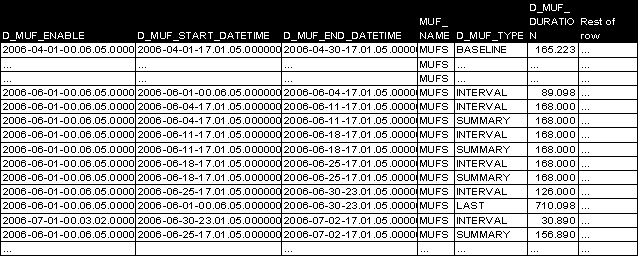
To build DSV output using the baseline rowset and the four summary rowsets, the following are the parameters specified:
|
Parameter |
Value |
Parameter |
Value |
|---|---|---|---|
|
AUTOCOLL |
DSVOUT |
AUTOCOL |
DSVOUT |
|
DELIMITER |
";" |
DELIMITER |
";" |
|
DECIMAL |
"" |
DECIMAL |
"" |
|
MUFNAME |
MFS |
MUFNAME |
MFS |
|
HEADER |
YES |
HEADER |
NO |
|
TYPE |
BASELINE |
TYPE |
SUMMARY |
|
DATERG |
2006043020060430 |
DATERG |
2006061120060702 |
|
TIMERG |
000000240000 |
TIMERG |
000000240000 |
The DSV output for all Delta tables would be as follows:
D_MUF_ENABLE;D_MUF_START_DATETIME;D_MUF_END_DATETIME;MUF_NAME;D_MUF_TYPE;D_MUF_DURATION;Rest headers
2006-04-01-00.06.05.000000;2006-04-01-17.01.05.000000;2006-04-30-17.01.05.000000;MUFS;BASELINE;165.223;…
2006-06-01-00.06.05.000000;2006-06-04-17.01.05.000000;2006-06-11-17.01.05.000000;MUFS;SUMMARY;168.000;…
2006-06-01-00.06.05.000000;2006-06-11-17.01.05.000000;2006-06-18-17.01.05.000000;MUFS;SUMMARY;168.000;…
2006-06-01-00.06.05.000000;2006-06-18-17.01.05.000000;2006-06-25-17.01.05.000000;MUFS;SUMMARY;168.000;…
2006-06-01-00.06.05.000000;2006-06-25-17.01.05.000000;2006-07-02-17.01.05.000000;MUFS;SUMMARY;156.890;…
The file could then be uploaded to Excel:

The DSV output from the summary Delta (BVM and BVD) would be the same format as all the Delta datasets.


|
Copyright © 2014 CA.
All rights reserved.
|
|