

The following is a sample of Delta rowsets. The user would like to build a spreadsheet from the weekly summary records in this example.
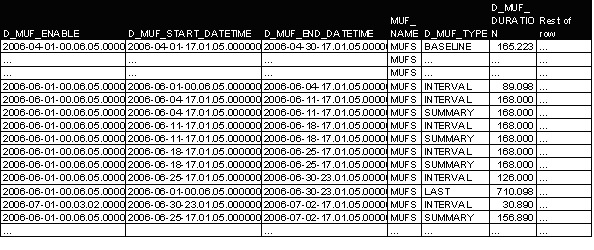
To build DSV output using the four summary records from June. The following are the parameters specified:
|
Parameter |
Value |
|---|---|
|
DELIMITER |
";" (semicolon) |
|
DECIMAL |
"." (period) |
|
MUFNAME |
MFS |
|
HEADER |
YES |
|
TYPE |
SUMMARY |
|
DATERG |
2006061120060702 |
|
TIMERG |
000000240000 |
The DSV output from the detail Delta tables would be as follows:
D_MUF_ENABLE;D_MUF_START_DATETIME;D_MUF_END_DATETIME;MUF_NAME;D_MUF_TYPE;D_MUF_DURATION;Rest headers…
2006-06-01-00.06.05.000000;2006-06-04-17.01.05.000000;2006-06-11-17.01.05.000000;MUFS;SUMMARY;168.000;…
2006-06-01-00.06.05.000000;2006-06-11-17.01.05.000000;2006-06-18-17.01.05.000000;MUFS;SUMMARY;168.000;…
2006-06-01-00.06.05.000000;2006-06-18-17.01.05.000000;2006-06-25-17.01.05.000000;MUFS;SUMMARY;168.000;…
2006-06-01-00.06.05.000000;2006-06-25-17.01.05.000000;2006-07-02-17.01.05.000000;MUFS;SUMMARY;156.890;…
The file could then be imported into Excel:

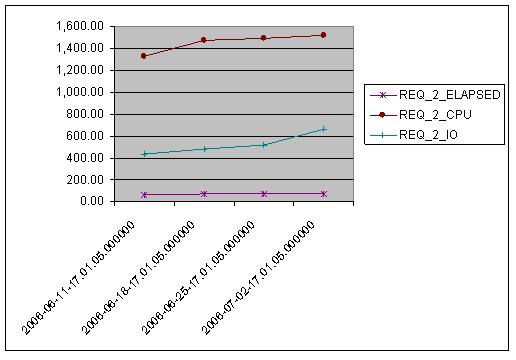
From here, the user can use many of the functions of Excel to produce spreadsheets and graphs to meet the business' need. Using the preceding spreadsheet, the following graph could be generated.
|
Copyright © 2014 CA.
All rights reserved.
|
|