

|
|
|
Note: For general configuration instructions, see the Universal Adapter guide, available from CA Technical Support.
To configure CA DLP integration with ZANTAZ Digital Safe, you need to enable the Universal Adapter (UA) to import emails from an Exchange mailbox and output them to the Digital Safe Adapter. The UA also needs to output the same emails to EVF files for subsequent importing into the CMS.
To configure the UA to do this, you need to modify input and output values in the following registry key on the UA host machine:
HKEY_LOCAL_MACHINE\Software\
  \ComputerAssociates\CA DLP
  \CurrentVersion\UniversalAdapter
The UniversalAdapter registry key itself contains a series of subkeys, containing the registry values that you need to edit to enable integration. An example key structure is shown below:
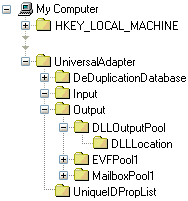
Registry values in these keys and subkeys are described in the following sections.
| Copyright © 2011 CA. All rights reserved. | Email CA Technologies about this topic |