

Each event has attributes as described in the following table.
|
Attribute |
Description |
Example |
||
|---|---|---|---|---|
|
Name |
A unique name for the event. |
Login Warning |
||
|
Class |
Identifier used to group similar events together. |
Security |
||
|
Subsystem |
The part of the serviced system being referred to. |
Logins |
||
|
Information |
Description to clarify what the event means. |
Login attempt failed |
||
|
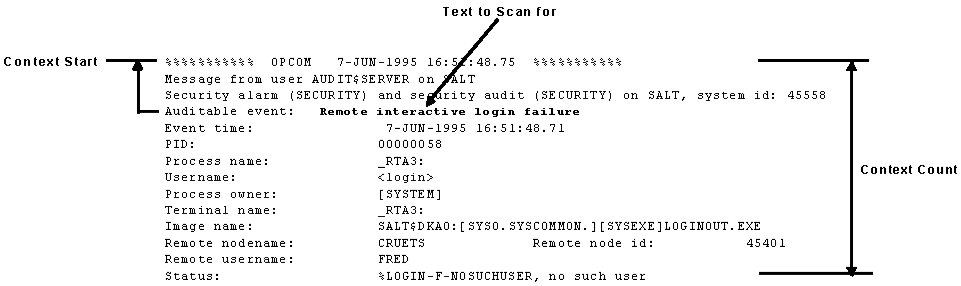
Text to Scan for 1 |
The literal or regular expression to be scanned for, and is sensitive to the case of the console data. |
Remote interactive login failure |
||
|
Event Text Type |
Whether the event is a literal or regular expression. |
Literal |
||
|
Event Priority |
The event priority from critical to indeterminate, which is used to modify the appearance of the event within some user interfaces (See the following table). |
WARNING |
||
|
Context Count1 |
The number of lines of console output which comprise the full event context. |
14 |
||
|
Context Start1 |
The line of console text which signifies the start of the event context. For example, if the context count is 14 and the event text match is on line 4, then the context start for the event will be 3 (context always begins at line 0). |
3 |
||
|
1 The use of these attributes is shown in the table in the section, Literal Strings and Regular Expressions in Events, earlier in this chapter. |
|
|
||
|
Priority |
Color |
|---|---|
|
CRITICAL |
Red |
|
MAJOR |
Magenta |
|
MINOR |
Orange |
|
WARNING |
Yellow |
|
CLEAR |
Green |
|
INDETERMINATE |
Light blue |
You can change the default colors from the C3 interface. See Chapter 9, “Customizing Console Manager,” for more information.
The following figure shows an example of an event using the context attributes.
|
Copyright © 2010 CA.
All rights reserved.
|
|