

ENS is made up of the following components:
|
Component |
Description |
See Section... |
|---|---|---|
|
Events |
Predefined series of characters received on the console line of the serviced system. |
Events |
|
Scans |
Collections of related events, or other scans. |
Scans |
|
Filters |
Definitions of the conditions which must be met when an event is detected so that actions can be dispatched. |
Filters |
|
Actions |
Command procedures or executable images that are dispatched when ENS is passed an event for which there is a matching filter record. |
Actions |
For ENS to work, you must define the events, scans, filters and actions in the configuration database.
The chapter Setting Up the ENS Components explains how to use the configuration editor to set up the ENS components in your configuration database to notify you of events.
The remaining sections in this chapter describe these components.
The following figure gives an overview of the ENS components.
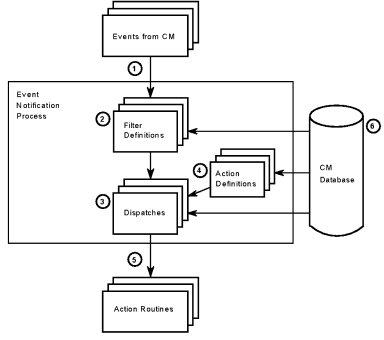
ENS receives an event from one of the Console Controllers.
The event is checked against the filter definitions in the configuration database. If no match is found, the event is discarded. If matches are found, the dispatches associated with the matching filters are invoked.
|
Copyright © 2010 CA.
All rights reserved.
|
|