

This scenario describes how to receive events from a group of systems at a remote site, both during working hours and during non-working hours.
An operations supervisor based in London, England, needs to know about all events on the systems in the Sydney Datacentre in Australia. The supervisor needs to be notified in two ways, depending on the day and time:
Two actions, one filter and two dispatches are required. However, only one action need be created, since the existing Mail action can be used for dispatching events during non-working hours.
Assume that the events, classes and serviced systems have already been created in the configuration database, and that the systems are in a group called Sydney. Also, the DECwindows Motif transport is TCP/IP.
To set up the filtering mechanism for specific times of the day, do the following:
|
Step |
Action |
For Command Line Interface |
For C3 Interface |
|---|---|---|---|
|
1. |
Start the configuration editor |
Starting the Configuration Editor in Chapter 4, “Modifying the Configuration Database” |
Starting the Configuration Editor in Chapter 4, “Modifying the Configuration Database” |
|
2. |
Create an action with the following attributes: Name Enter Sydney Information Enter Events from the Sydney Datacentre Command Enter: CONSOLE$EVENTLIST Action Type Select the “ALL events and EACH userdata item” option Parameters To Pass Select Userdata only, deselect all others To Action |
Adding Actions in Chapter 11, “Setting Up the ENS Components” |
Adding Actions in Chapter 11, “Setting Up the ENS Components” |
|
3. |
Create a filter with the following attributes: Name Enter Sydney Information Enter Events from the Sydney Datacentre Events Select All Events Classes1 Select All Classes Systems Deselect All Systems Groups Deselect All Groups, and select only the group Sydney Subsystems Select All Subsystems Priorities Select All Priorities. |
Adding Filters and Dispatches in Chapter 11, “Setting Up the ENS Components” |
Adding Filters in Chapter 11, “Setting Up the ENS Components” |
|
4. |
Create a dispatch for the working hours with the following attributes: Action to Enter Sydney dispatch Information Enter Events from the Sydney Datacentre Userdata Enter opsmgr.lon.dec.com 0 0 tcpip Deselect Execute at all Times on All Days Dispatch See the following figure Hours... for settings |
Adding Filters and Dispatches in Chapter 11, “Setting Up the ENS Components” |
Adding Dispatches for Your Actions in Chapter 11, “Setting Up the ENS Components” |
|
5. |
Create a dispatch for the non-working hours with the following attributes: Action to Enter Mail dispatch Information Enter Events from the Sydney Datacentre Userdata Enter opsmgr@opsmgr.lon.dec.com Deselect Execute at all Times on All Days Dispatch See the last figure in this section for the Hours... settings |
Adding Filters and Dispatches in Chapter 11, “Setting Up the ENS Components” |
Adding Dispatches for Your Actions in Chapter 11, “Setting Up the ENS Components” |
The following figure shows the settings for dispatching events during working hours.
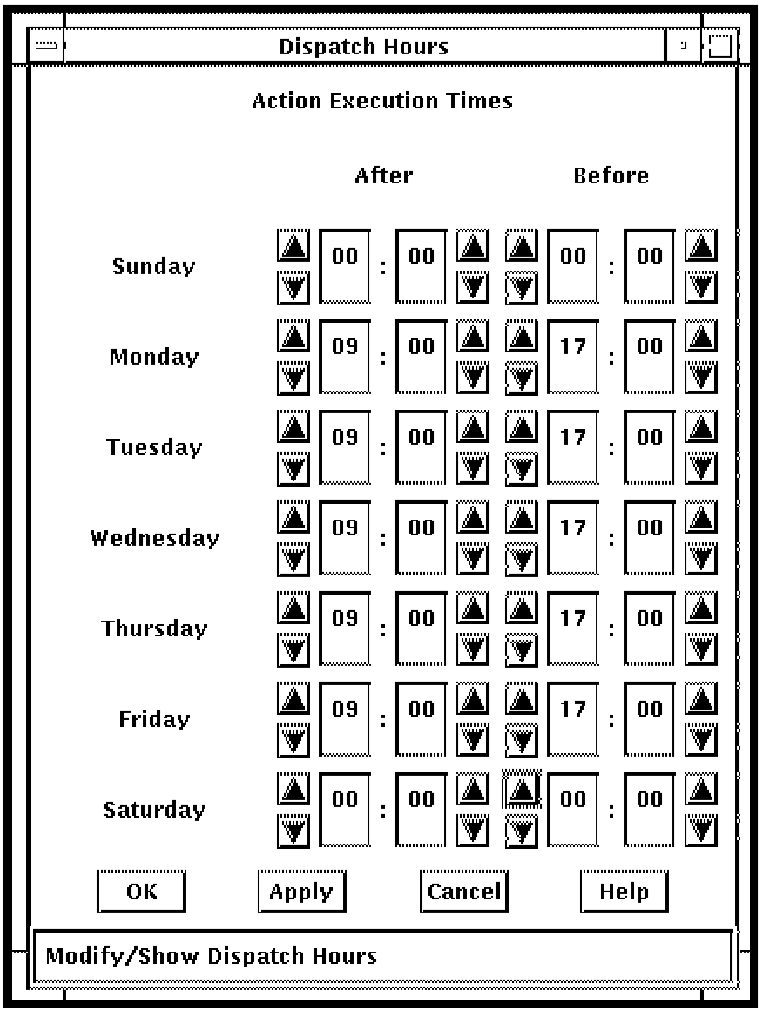
The following figure shows the settings for dispatching events during non-working hours.

|
Copyright © 2010 CA.
All rights reserved.
|
|