Compression Analysis and Implementation › Analysis › Selecting the Implementation Mode—VSAM
Selecting the Implementation Mode—VSAM
The steps that follow assume that the system defaults are set to give you a choice of implementation modes. After selecting Implement (and after specifying the FDT name if Huffman, SHRVL, or Tailored was selected), the Implement Super Express Compression panel is displayed.
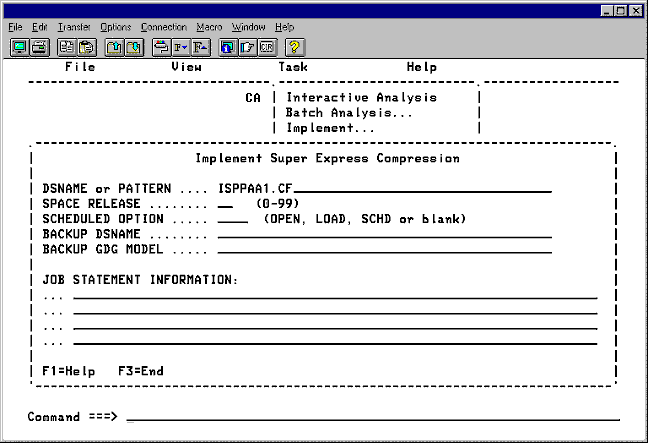
In the SCHEDULED OPTION field type OPEN or LOAD and press Enter or select no option.
- OPEN—the data set is implemented for compression the next time it is opened for output.
- LOAD—the data set is implemented for compression the next time it is loaded.
If no option is selected, specify the backup data set name for the unload step in the DSNAME field.
Type the JOB STATEMENT INFORMATION.
Move the cursor to the command line, and select one of the following:
- SUBMIT—to submit the JCL without saving it, type SUBMIT and press Enter.
- SAVE—to save the JCL to a PDS member, type SAVE and press Enter. Type the name of the data set and member and press Enter.
- EDIT—to invoke the ISPF editor, type EDIT and press Enter. Type the data set name and member and press Enter. The contents of the member are displayed in an ISPF edit session.
- END—to exit without building the JCL and control cards, type END and press Enter, or press PF3.
|
Copyright © 2012 CA.
All rights reserved.
|
|

