

|
|
|
The steps that follow assume that the system defaults are set to give you a choice of implementation modes. After selecting Implement (and after specifying the FDT name if Huffman, SHRVL, or Tailored was selected), the Implement Physical Sequential Compression panel appears.
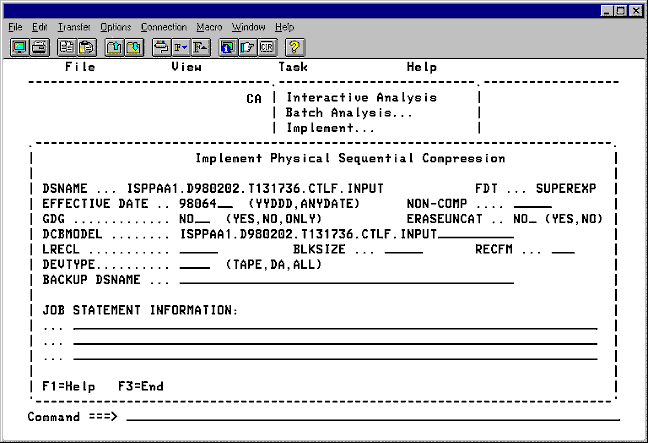
In the EFFECTIVE DATE field, enter the Julian date or ANYDATE that compression is to be implemented and press Enter.
In the NONCOMP field, you can specify a noncompressible area at the beginning of each record and press Enter.
In the GDG field, specify whether pattern matches should be recognized for all data sets including GDGs (YES), excluding GDGs (NO), or only for GDGs (ONLY) and press Enter.
In the ERASEUNCAT field, specify whether the entry should be purged (YES) from the Control File when the data set becomes uncataloged and press Enter.
In the DCBMODEL field, enter a cataloged data set from which to extract RECFM, LRECL, and BLKSIZE attributes, or explicitly supply these values yourself. If you specify both DCBMODEL and individual attributes, any individual attributes supplied override the values obtained from the DCBMODEL data set.
In the DEVTYPE field type DA to limit compression to Direct Access or TAPE to limit compression to Tape. Leave blank or say ALL to compress on any device.
Move the cursor to the command line, and type one of the following line commands:
| Copyright © 2012 CA. All rights reserved. |
|