

Deployment › Verify Deployment › Verify Microsoft SQL Deployment
Verify Microsoft SQL Deployment
Deploy the SQL server in a cluster on OSS-SQL1 and OSS-SQL2. Power on the Microsoft SQL Server after you deploy it.
The following steps verify that the SQL cluster is deployed correctly.
Follow these steps:
- Log in to the server (OSS-SQL1) with oss\administrator credentials.
- Navigate to the Failover Cluster Manager page from Start, Administrative Tools, Failover Cluster Manager.
- Verify that the status of the following clusters is set to Online, which indicates that the SQL Cluster is running.
- OSS-SQLCLUSTER
- IP Address
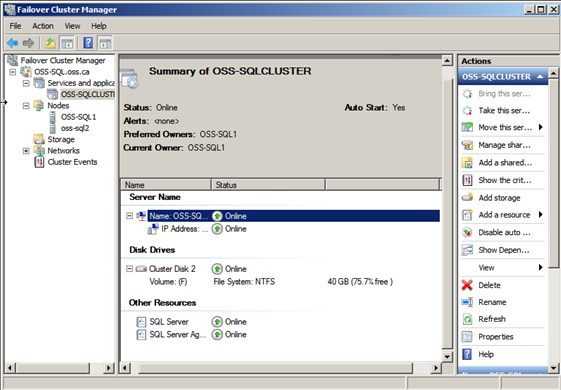
You have verified that the Microsoft SQL Server is deployed successfully.
Note: If the cluster fails, see Validate Cluster.
Copyright © 2014 CA.
All rights reserved.
|
|