

Monitoring Services Deployment › Verify Deployment › Verify CA Nimsoft Infrastructure Manager
Verify CA Nimsoft Infrastructure Manager
To verify the deployment, log in to the virtual machine where the CA Nimsoft Infrastructure Manager is deployed.
Follow these steps:
- Log in to Nimsoft Infrastructure Manager host with administrator credentials.
- Click Start, All Programs, Nimsoft Monitoring, Infrastructure Manager.
The Nimsoft Infrastructure Manager window opens.
- Verify that you have a parent child relationship for Domains, MaaS-Central-Domain, MaaS-Central-Hub, and MaaS-Central-Robot.
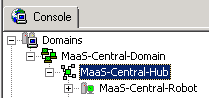
You have verified that Nimsoft Infrastructure Manager is deployed.
Copyright © 2014 CA Technologies.
All rights reserved.
|
|