

The workbox is the work surface of the installation dialog editor. It represents the general layout of an installation dialog.
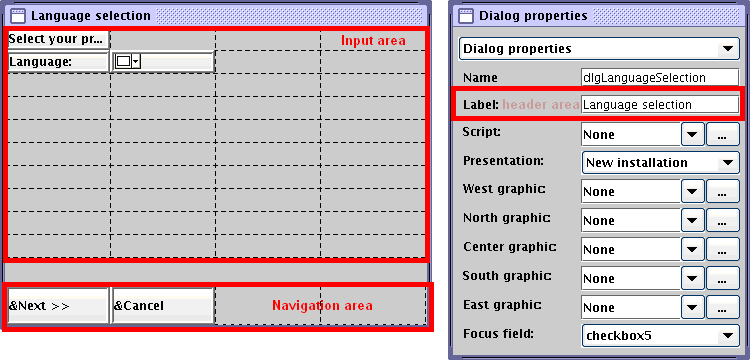
Contains the header (title) of the installation dialog. The header area is not shown in the work box. The header is defined in the Label field in the Dialog properties box.
Indicates the main area of the installation dialog. Input area is represented by the 10x4 grid. All dialog elements except for the navigation button can be moved from the toolbox into this area using the drag-and-drop feature. Within the input area, all dialog elements can also be moved using the drag-and-drop feature. A virtual grid with dotted lines, four columns by ten rows, is layered over the input area to position the dialog elements. The grid layout is controlled by Java; the position and content of some dialog elements may influence the size and position of another dialog element.
Lets you define navigation buttons only. Navigation buttons are used to navigate between installation dialogs. Navigation area is the last line in the work box and is represented by the 1x4 grid.
The following screenshot displays the Header, Input, and Navigation areas:
To view the current layout of the installation dialog being built, click the Test dialog icon on the toolbar.
|
Copyright © 2014 CA Technologies.
All rights reserved.
|
|