

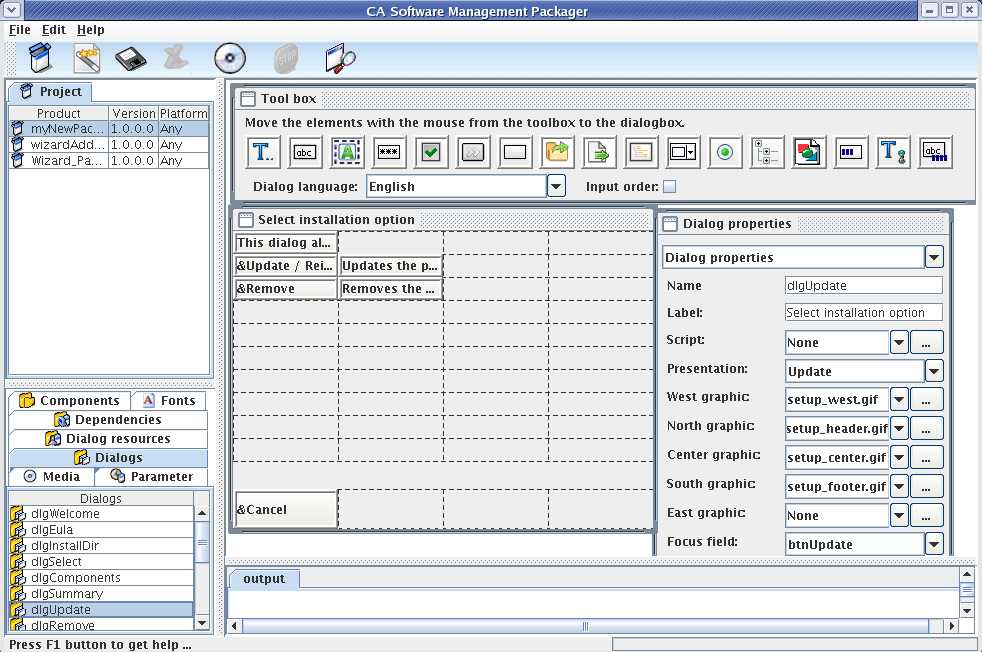
The Packager GUI provides an installation dialog editor and several tools and features to modify standard installation dialogs to fit your needs or create individual new installation dialogs. The installation dialog editor lets you drag and drop dialog elements from a toolbox into a work area and customize the dialog elements through properties boxes.
Note: The drag and drop task involves the following steps:
The installation dialog editor opens when you select a dialog on the Dialogs tabs in the subproject pane or right-click on the Dialogs tab and choose to add a new dialog.
The following screenshot shows a sample installation dialog editor window:
Whenever you want to see the current layout of selected dialog, for example, during dialog creation, click the Test dialog icon on the toolbar of the Packager GUI.
|
Copyright © 2014 CA Technologies.
All rights reserved.
|
|