

This scenario explains how a database administrator uses CA Chorus modules and tools to troubleshoot DB2 issues.
Your company strives to give its employees the best opportunity to succeed. As such, they have started a corporate initiative to monitor DB2 systems. To support this corporate goal, your company gathers the following metrics in a spreadsheet quarterly to confirm that they adhere to internal service-level agreements (SLAs):
To help ensure that the response time and closure time do not exceed the SLA, particularly for high severity issues, each morning your DBAs review the alerts that have occurred. The alerts are generated based on thresholds set in CA SYSVIEW for DB2. The Alerts module displays issues when a defined processing limit is reached or exceeded on the systems that the DBA is monitoring. The Alerts module lets DBAs monitor and investigate alerts from the workspace as they are generated. It contains all of the alerts that the DBA sees automatically based on the discipline.
For high severity issues, your DBA immediately responds to and resolves the issue using the following tools, which are accessible from the CA Chorus workspace. The following diagram and text detail the steps the DBA takes to investigate the issue.
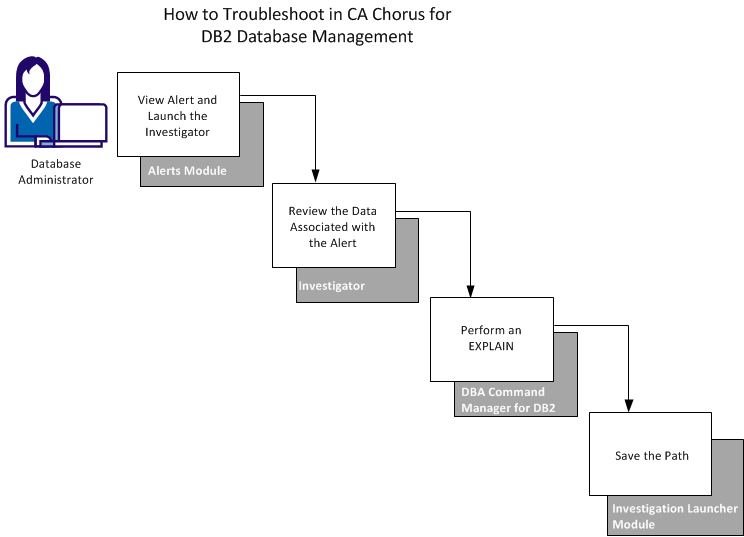
By using CA Chorus tools, a DBA can quickly and efficiently identify an issue, determine the root cause, and enter the commands to resolve it. These actions help improve their response time for DB2 database issues.
|
Copyright © 2015 CA Technologies.
All rights reserved.
|
|