

|
|
|
The Display Unified Attributes advanced option in the Complete Compare wizard was changed in r7.3.11.
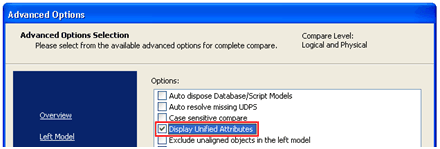
When this option is selected, all lead and non-lead unified foreign key (FK) columns and the corresponding key group members are included in Complete Compare. When this option is not selected, then Complete Compare only includes the lead unified FK column and corresponding key group members. The non-lead unified FK columns and corresponding key group members are not included in the Complete Compare.
Example: Two models being compared in the Complete Compare process
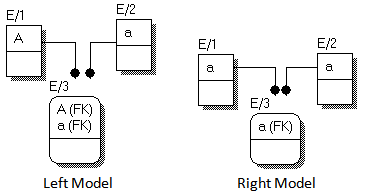
In the previous example, the columns are not unified in the left model under entity E/3. In the right model the columns are unified under entity E/3.
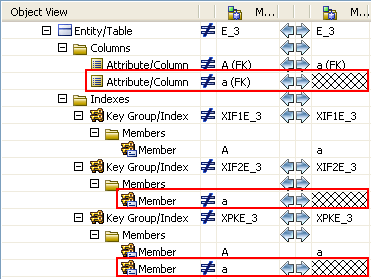
The following example shows the Complete Compare results screen if you did not select the Display Unified Attributes option. There will not be any effect of this selection in the left model as nothing is unified. In the right model, only the unified lead FK column is included in the compare. Here you will see the differences in the columns and key group members of FK and PK; these are valid differences.
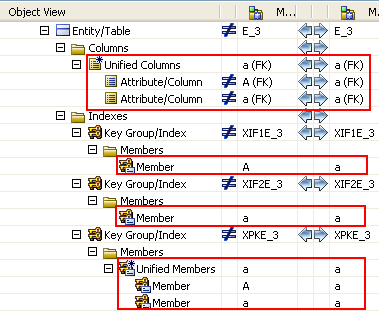
The following example shows the Complete Compare results screen if you selected the Display Unified Attributes option. Again, there is no difference on the left model as nothing is unified. In the right model, now all of the unified FK columns (lead and non-lead) and corresponding key group members are included in the compare. The unified FK columns show some property level differences, and no differences in the key group members.
| Copyright © 2013 CA. All rights reserved. |
|