

It is often required to store values for a group of resources where the members of this group may be dynamic and change during the calculation period. In the following requirement example calculation, it is necessary to perform an intermediate calculation on each of the resources in order to reach the final aggregate result.
Following are a few such examples:
In these examples, Sites are resources that have incidents associated with them.
A server is a resource for which availability percentage must be evaluated.
In this case, a transaction type is a resource that has failure events associated with it. For each transaction type, a failure counter is stored as an intermediate result and the number of different transaction types that had more than X failures are counted.
Example:
For the following calculation requirement:
Calculate the percentage of availability for a system that is comprised of a cluster of servers. The system is considered available only when all underlying servers are available.
The solution design will be implemented as follows:
The system availability is evaluated by the availability of its underlying Cluster resources. In this case, it is required to manage and store the status of all the Clustered resources in order to evaluate the system status at each point in time.
In order to do so, the formula is required to hold a map (ServerAvailabilityIndicators map in the example code below) that has an entry for each of the monitored resources. Since all map objects require a key field to reference the associated value, this map will have the resource indicator as the key (which is the resource ID) and the value will be the component status. Whenever the status of a component changes, the relevant entry in this map should be changed. Upon each availability event the formula will update the status of the relevant resource in the map and reevaluate the system status accordingly.
Since the monitored resources may change ( some might be removed and some might be added during the calculation period) this must be managed within the formula by adding a function that identifies the change and updates the monitored component map by adding a new entry for a new component or deleting an entry if a component was removed.
OnRegistration is the event handler that manages a Registration Event which is triggered when a change in the monitored resources occur. Such a change may occur as a result of committing a resource (or change set) that may produce changes in the resources included in the calculation, according to the formula's registration method.
During each registration it is necessary to update the map that holds the resource statuses with any required changes. This means comparing the map used to hold the resource statuses with the map that holds the resources at the time that the registration is run (based on the registration method), and include all of the resources that were added or delete the resources that were removed.
The OnRegistration procedure must therefore execute a function which compares the monitored resources against the new allocated resources in order to structure the monitored resources accordingly.
The Context object has a set of methods which parallel the registration methods. These return a map with all of the resources that are a part of the resources according to the registration method.
In the following example the registration of the formula is ByContractParty and the same method is therefore used by the Context.ResourcesOfContractParty. This returns a map with all of the resources that are a part of this set at the time of registration.
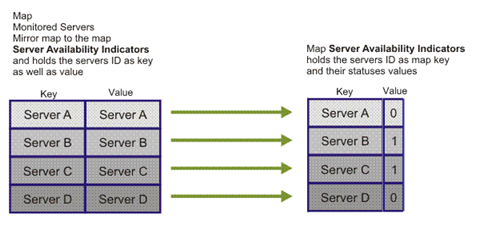
To compare the two maps, it is necessary to iterate through the maps in parallel. Iterating the maps is done using the "For Each" statement. This statement allows iteration through the values of a map and therefore another map is needed as a mirror to the statuses map in order to be able to iterate through the resources and not their status values. This statement iterates the values of a map and not its keys. Therefore, an extra map that holds the IDs both as a key and also as a value is needed. Furthermore, maintain the mirror map to continually mirror the statuses map, so that it always holds the same set of resources. This means that whenever the statuses map is updated, then the mirror map must be updated as well.
The following figure displays the concept of the mirroring maps.
Example:
Dim ServerAvailabilityIndicators
Dim MonitoredServers
Set ServerAvailabilityIndicators=CreateObject("SlalomMap.Map")
Set MonitoredServers=CreateObject("SlalomMap.Map")

Sub OnRegistration(dispatcher)
   dispatcher.RegisterByContractParty "OnAvailabilityEvent",_
      "Availability Event", "SAP Production Server"
   Dim AllocatedServers
   Set AllocatedServers = Context.ResourcesOfContractParty("SAP Production Server")
   UpdateMonitoredServers AllocatedServers
End Sub

Sub UpdateMonitoredServers(allocatedServers)
   Dim Server
   For Each Server In allocatedServers
      If Not MonitoredServers.Exist(Server) Then
         MonitoredServers(Server) = Server
         ServerAvailabilityIndicators(Server)=True
      End If
   Next

   For Each Server In MonitoredServers
      If Not allocatedServers.Exist(Server) Then
         MonitoredServers.Erase Server
         ServerAvailabilityIndicators.Erase Server
      End If
   Next
End Sub
Example:
The following function demonstrates how the mirror map is used to iterate through the statuses map when required to evaluate the status of the whole system based on the status of each of the monitored resources.
In this example, the system is considered available if all of the resources are available. Having a single component down is enough to consider the system down:
Function SystemAvailability
   Dim Server
   For Each Server In MonitoredServers
      If ServerAvailabilityIndicators(Server) = DOWN then
         SystemAvailability=DOWN
         Exit Function
      End if
   Next
End Function
A full Business Logic example with dynamic resource handling is described in the following design pattern example.
|
Copyright © 2013 CA.
All rights reserved.
|
|