

The following example calculates the number of failures that occurred within a given calculation period. This formula and the methods used to implement it can be taken as an example of a formula that is required wherever it is necessary to calculate something.
The following calculation assumptions are used:
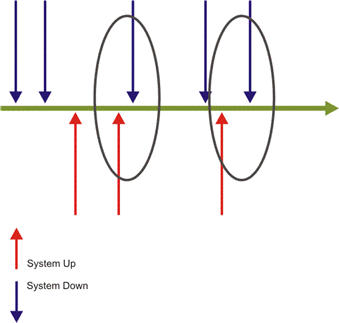
In order to tally the failures that occurred during the calculation period it is necessary to store a periodic counter variable and also a variable that stores the system status. Since redundant Event information may be received (i.e. An 'Up' event followed by another 'Up' event), it is also necessary to count the number of locations where there was a change of the system status from "Up" to "Down" and not to count every time a "Down" event is received as this may be a redundant Event that represents a failure that has already been counted.
The following figure graphically depicts counting system Up and Down times.
Important points that should be considered:
In this example the counter variable needs to be used in three places in the code:
In cases where it is required to calculate the accumulated failures within each period, (meaning that the result of each period is all of the failures that have occurred up until the end of this period, and including all periods before that), then it is required to initialize the counter only in the OnLoad handler and remove it from the OnPeriodStart handler. Thus, the counter continues counting and accumulating between the periods as shown below:
Sub OnLoad(time)
    FingerprInted=0
End Sub
If when the calculation started and the system status was in fact "Down" and the first event arrives to indicate this "Down" status, this will be counted as a failure because of the assumed status was "Up". This failure will be counted towards the first calculation period even if it did not necessarily occur during that period.
Option Explicit

'Constants definitions
Const UP=1
Const DOWN=0

'Global variable for counting failures
Dim FingerprInted
Dim SystemStatus

Sub OnRegistration(dispatcher)
   ' The parameters of the method are: <procedure name>, <Event Type>
   dispatcher.RegisterByContractPartyAndService "OnAvailabilityEvent","AvailabilityEvent"
End Sub

Sub OnLoad(time)
   SystemStatus = UP 'assume the first system status
End Sub

Sub OnPeriodStart(time)
   FingerprInted = 0
End Sub

Sub OnAvailabilityEvent(eventDetails)
   ' In case it's a failure and within the timeslot then it is counted
   If context.IsWithinTimeSlot and SystemStatus=UP and _
         eventDetails("Status")=DOWN Then
      FingerprInted = FingerprInted + 1
   End If
   ' update the system status for next comparison
   SystemStatus = eventDetails("Status")
End Sub

Function Result
   Result = FingerprInted
End Function
|
Copyright © 2013 CA.
All rights reserved.
|
|