

The design pattern described in this section is suitable whenever the required result is a function of a time period that has lapsed between events, for example:
For accumulating time, it is necessary to assign a variable in which time can be accumulated (in seconds) and to implement a function that checks both the conditions and time accumulated since the last update time transpired. This function is then executed for every Event received to the formula.
The following figure depicts the clock handling time accumulation.
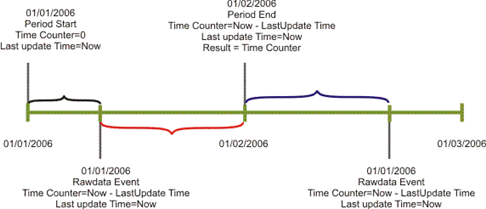
The LastUpdateTime variable stores the last time the update was executed, regardless whether the time counter was updated or not. The function holds the condition that determines whether the time should be updated and accumulated. For example, the time should not be considered if it exceeds the timeslot period, the system status was Down, or the incident had a pending status.
Although the situation detailed here often uses the Tools.NetTime() function to calculate durations, there may be cases where using the standard VB function DateDiff() is preferable.
The Tools.NetTime function incurs an overhead of checking the timeslot each time it is used. It is recommended to avoid using NetTime in the data event procedures since these procedures are called for any new incoming event and therefore invoke the NetTime call. If your timeslot is 24/7, it is recommended that you use the DateDiff function to avoid the overhead of checking the timeslot.
Example 1:
The following 'update counters' routine accumulates the total period of time in the PeriodNetTime variable. In AvailabilityTime the routine accumulates the time that the system status was Up, meaning that the system was available.
The Tools object contains the NetTime method, NetTime(beginTime, endTime)0. This method returns the number of seconds between beginTime and endTime that are within the timeslot of the current Metric. Any time between these two variables is part of a timeslot that is excluded, hence, it is very commonly used for duration calculations where a timeslot is used. (For example: for Priority 1 Tickets resolved within four business hours, where even though a ticket was raised at the end of a business day and might not be solved until the next morning, it is still within SLA due to the timeslot hours being excluded.)
Sub UpdateCounters (time)
   PeriodNetTime = PeriodNetTime + tools.NetTime (LastUpdateTime, time)
   If SystemStatus = UP Then
      AvailabilityTime = AvailabilityTime + tools.NetTime (LastUpdateTime, time)
   End If
   LastUpdateTime = time
End Sub
Example 2:
The following example calculates the application availability by handling Up and Down events of several critical components, as well as the maintenance events of those components. If all components are under maintenance, time is not considered as expected availability time.
The subroutine UpdateCounters advances the time counters when necessary and is executed with every event received to the formula (Raw Data Event/Engine Event). It also updates the expected available time in cases where the time is within the timeslot period and the components are not within a planned downtime period. The formula updates the actual availability time only when it also has a system status of "Up".
DateDiff is a standard VB function that returns the time between two dates, but does not exclude any timeslot information.
'Force variable declaration
Option Explicit

'Global variables
Dim ExpectedAvailabilityTime
Dim ActualAvailabilityTime
Dim LastUpdateTime
Dim AvailabilityIndicators
Dim MonitoredComponents
Dim DowntimeStatuses

'Map objects creation
Set AvailabilityIndicators=CreateObject("SlalomMap.Map")
Set MonitoredComponents=CreateObject("SlalomMap.Map")
Set DowntimeStatuses=CreateObject("SlalomMap.Map")

'After loading and whenever an infrastructure change occurs
Sub OnRegistration(dispatcher)
   dispatcher.RegisterByResourceGroup "OnComponentDownEvent","Component Down","Application Components"
   dispatcher.RegisterByResourceGroup "OnComponentUpEvent","Component Up","Application Components"
   dispatcher.RegisterByResourceGroup "OnMaintenanceStartEvent","Maintenance Start","Application Components"
   dispatcher.RegisterByResourceGroup "OnMaintenanceEndEvent","Maintenance End","Application Components"
   UpdateCounters Context.RegistrationTime

   Dim AllocatedComponents
   Set AllocatedComponents = Context.ResourcesOfResourceGroup("Application Components")

   'make sure formula is monitoring only relevant and all the relevant resources
   UpdateMonitoredComponents AllocatedComponents
End Sub

Sub OnLoad(time)
   'When system goes up for the first time - assume availability OK
   LastUpdateTime = time
End Sub

Sub OnPeriodStart(time)
   'initializing counters to renew periodic calculation
   ExpectedAvailabilityTime = 0
   ActualAvailabilityTime = 0
End Sub

Sub OnTimeslotEnter(time)
   UpdateCounters time
End Sub

Sub OnTimeslotExit(time)
   UpdateCounters time
End Sub

Sub OnComponentDownEvent(eventDetails)
   UpdateCounters eventDetails.Time
   'write availability status of reported-on resource
   AvailabilityIndicators(eventDetails.ResourceId) = _
      AvailabilityIndicators(eventDetails.ResourceId)+1
End Sub

Sub OnComponentUpEvent(eventDetails)
   UpdateCounters eventDetails.Time
   'write availability status of reported-on resource
   AvailabilityIndicators(eventDetails.ResourceId)= _
      AvailabilityIndicators(eventDetails.ResourceId)-1
End Sub

Sub OnMaintenanceStartEvent(eventDetails)
   UpdateCounters eventDetails.Time
   'write availability status of reported-on resource
   DowntimeStatuses(eventDetails.ResourceId)= _
      DowntimeStatuses(eventDetails.ResourceId)+1
End Sub

Sub OnMaintenanceEndEvent(eventDetails)
   UpdateCounters eventDetails.Time
   'write availability status of reported-on resource
   DowntimeStatuses(eventDetails.ResourceId)= _
      DowntimeStatuses(eventDetails.ResourceId)-1
End Sub

Sub OnPeriodEnd(time,isComplete)
   UpdateCounters time
End Sub

Function Result
   If ExpectedAvailabilityTime <> 0 Then
      Result = 100 * (ActualAvailabilityTime / ExpectedAvailabilityTime)
   Else
      Result = Null
   End If
End Function

Sub UpdateCounters(time)
   If Context.IsWithinTimeslot And Not AllComponentsAreInPlannedDowntime Then
      'update counter of seconds in period (when availability is expected)
      ExpectedAvailabilityTime = ExpectedAvailabilityTime + DateDiff("s",LastUpdateTime,time)
      If SystemIsAvailable Then
         'update seconds-of-availability counter
         ActualAvailabilityTime = ActualAvailabilityTime + DateDiff("s",LastUpdateTime,time)
      End If
   End If
   LastUpdateTime=time
End Sub

Sub UpdateMonitoredComponents(allocatedComponents)
   Dim Component
   'add to monitored Components map all new Components to be monitored
   For Each Component In allocatedComponents
      If Not MonitoredComponents.Exist(Component) Then
         MonitoredComponents(Component) = Component
         AvailabilityIndicators(Component) = 0
         DowntimeStatuses(Component) = 0
      End If
   Next

   'remove from monitored Components map all no-longer-relevant Components
   For Each Component In MonitoredComponents
      If Not allocatedComponents.Exist(Component) Then
         MonitoredComponents.Erase Component
         AvailabilityIndicators.Erase Component
         DowntimeStatuses.Erase Component
      End If
   Next
End Sub

Function SystemIsAvailable
   Dim SystemAvailability
   SystemAvailability = True

   Dim Component
   Dim ComponentAvailability
   For Each Component In MonitoredComponents
      ComponentAvailability = AvailabilityIndicators(Component) = 0 _
         Or DowntimeStatuses(Component) > 0
      'system availability is evaluated with availability
      SystemAvailability = SystemAvailability And ComponentAvailability
   Next
   SystemIsAvailable = SystemAvailability
End Function

Function AllComponentsAreInPlannedDowntime
   Dim ComponentsInPlannedDowntime
   ComponentsInPlannedDowntime = 0
   Dim Component
   For Each Component In MonitoredComponents
      If DowntimeStatuses(Component) > 0 Then
         ComponentsInPlannedDowntime = ComponentsInPlannedDowntime + 1
      End If
   Next

   If ComponentsInPlannedDowntime = MonitoredComponents.Count Then
      AllComponentsAreInPlannedDowntime = True
   Else
      AllComponentsAreInPlannedDowntime = False
   End If
End Function
|
Copyright © 2013 CA.
All rights reserved.
|
|