

This section describes a solution that can be implemented if the data source files (input to an CA Business Service Insight Adapter) are located in different directories each day, or for all set periods of time (according to a specific naming convention).
For example, given the directory structure c:\NewData\YYYY\MM\DD. In this instance, for each day there is a new directory in which the relevant files for that day are located.
The CA Business Service Insight Adapter needs to browse through the newest directory and load the new files.
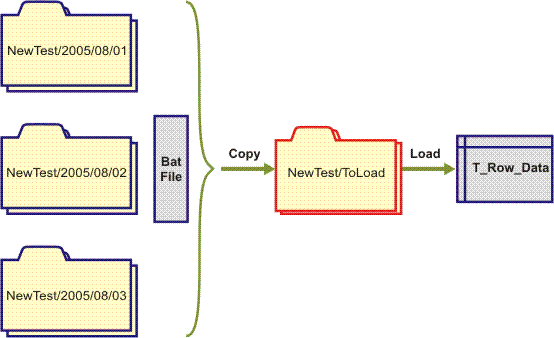
An available work-around is to add some commands to the beginning of the bat file that runs the Adapter. These commands copy the data sources that need to be loaded from the specific folder (according to their conventions) to a single dedicated folder that was created specifically for this purpose. The Adapter always loads the information from this folder.
The following image describes this solution:
|
Copyright © 2013 CA.
All rights reserved.
|
|