

The following image depicts the Business Logic position within CA Business Service Insight. It falls beneath each of the Metrics within the contracts.
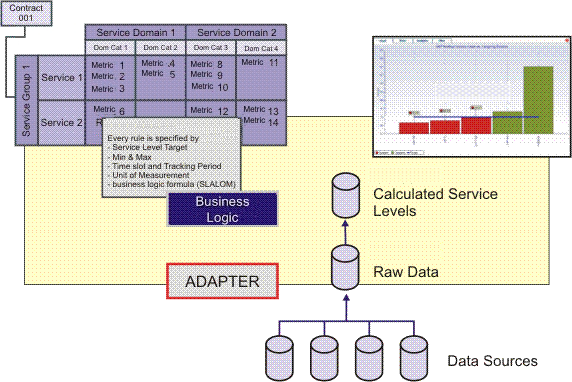
At this stage of the implementation, the relevant Adapters are configured and the raw data records should already be available in the T_RAW_DATA table in CA Business Service Insight. It is now possible to apply the business logic to the events in order to produce the actual service level result for each Metric.
Business Logic Scripting is the process of writing code that logically operates on the raw data (Raw Data sent by Adapters) in order to calculate the service levels.
Each Metric has its own Business Logic formula with which to calculate the actual service level, although many of the Metrics in the system usually have a common logic that can be applied to different sets of raw data events.
For example, a Metric that calculates the Severity 1 ticket resolution time, and another Metric that calculates the Severity 2 ticket resolution time evaluate a different set of records-one uses only the Severity 1 tickets and the other only the Severity 2 tickets. However, both would most likely apply the same method in order to calculate the resolution time. The resolution time script will be developed and tested once, defined as a Business Logic module, and will then be used by both Metrics by including this module into the Metrics Business Logic areas.
Therefore usually when developing Business Logic scripts the main modules or templates are developed so as to make them available for all the Metrics in the system. In addition, each Domain category usually reflects a different type of measurement and therefore each Domain category will generally follow a different Business Logic module or template.
|
Copyright © 2013 CA.
All rights reserved.
|
|