

View the WAN Opt counter to display information about the packet digests that it receives from assigned Cisco WAE devices, including information about the Netflow packets that transport the packet digests.
To view the WAN Opt counter window, you must log into the CA Standard Monitor to which the Cisco WAE is assigned.
Important: Before you begin, synchronize the monitoring devices. The counter windows do not display until after you have synchronized data monitoring.
The WAN Opt counter displays the statistics from the Cisco WAE devices that are assigned to the monitor:
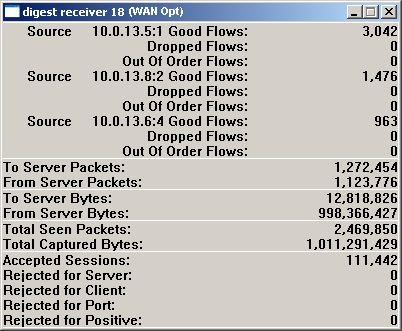
Identifies the number of Netflow packets that were received in the order they were sent.
Identifies the number of Netflow packets that were not processed by the CA ADA Monitor service. Response time data from any packet digests that were included in the dropped Netflow packets is not included in the management console reporting.
Identifies the number of Netflow packets that were received by the monitor, but were not received in the order they were sent.
Identifies the number of packets that were sent from a client to a server.
Identifies the number of packets that were sent from a server to a client.
Identifies the number of bytes that were sent from a client to a server.
Identifies the number of bytes that were sent from a server to a client.
Identifies the number of packets that were inspected to determine whether the packet header matched a specified application port, client network, and server subnet.
Identifies the total byte count for packets that match a specified application port, client network, and server subnet.
Note The Cisco WAAS Flow Agent inspects each packet header to determine whether the packet matches a specified application port, client network, and server subnet. For more information, see Total Seen Packets.
Identifies the number of TCP sessions that match a valid application/server/network combination in the management console.
Identifies the server IP did not match a server subnet monitored by the management console.
Identifies the client IP did not match the list of client networks to be monitored by the management console.
Identifies the server port matched the list of ports to be ignored by the management console.
Reserved for future use.
|
Copyright © 2014 CA Technologies.
All rights reserved.
|
|