

Version 3.7.14 - May 20, 2013
Note:
This section contains the following topics:
Catalog and Application Updates
Enhanced OS Support: Windows and Linux
Scalability Improvement: 100 Appliances per Server
Web User Interface Improvements
Infrastructure Editor Improvements
Cloud Commons Marketplace - Link from Support Page
Backbone Fabric Controller (BFC) New Features
This release includes a rebase of the following components to CentOS 6.3:
This enhancement delivers a more stable and robust underlying OS and capitalizes on the wealth of patches since the 5.x release of CentOS. It provides the following improvements:
|
Vendor Name |
Device Name |
Vendor ID:Device ID, |
|---|---|---|
|
3PAR Inc. |
3PAR Inc. unknown |
1590:0075, 1590:0076 |
|
3PAR Inc. |
3PAR Inc. unknown |
1590:0075, 1590:0077 |
|
3PAR Inc. |
3PAR Inc. unknown |
1590:0075, 1590:007d |
|
Adaptec |
AIC-9405W SAS (Razor-Lite ASIC non-RAID) |
9005:043e |
|
Adaptec |
AIC-9405W SAS (Razor-Lite ASIC RAID) |
9005:043f |
|
Adaptec |
AIC-9405W SAS (Razor-Lite HBA non-RAID) |
9005:0432 |
|
Adaptec |
AIC-9405W SAS (Razor-Lite HBA RAID) |
9005:0430 |
|
Adaptec |
AIC-9410W SAS (Razor ASIC non-RAID) |
9005:041e |
|
Adaptec |
AIC-9410W SAS (Razor ASIC RAID) |
9005:041f |
|
Adaptec |
AIC-9410W SAS (Razor HBA non-RAID) |
9005:0412 |
|
Adaptec |
AIC-9410W SAS (Razor HBA RAID) |
9005:0410 |
|
Adaptec |
ASC-58300 SAS (Razor-External HBA non-RAID) |
9005:0416 |
|
Brocade Communications Systems, Inc. |
1010/1020/1007 10Gbps CNA |
1657:0014 |
|
Brocade Communications Systems, Inc. |
415/815/41B/81B 4Gbps/8Gbps PCIe single port FC HBA |
1657:0017 |
|
Brocade Communications Systems, Inc. |
415/815/41B/81B 4Gbps/8Gbps PCIe dual port FC HBA |
1657:0013 |
|
Brocade Communications Systems, Inc. |
804/807 8Gbps FC HBA 1657:0021 |
1657:0021 |
|
Compaq Computer Corporation |
Compaq Computer Corporation unknown |
0e11:ffff |
|
Hewlett-Packard Company |
Hewlett-Packard Company unknown |
103c:323b, 103c:324d |
|
Hewlett-Packard Company |
Hewlett-Packard Company unknown |
103c:323b, 103c:333f |
|
Hewlett-Packard Company |
Hewlett-Packard Company unknown |
103c:323b, 103c:1920 |
|
Hewlett-Packard Company |
Hewlett-Packard Company unknown |
103c:323b, 103c:1921 |
|
Hewlett-Packard Company |
Hewlett-Packard Company unknown |
103c:323b, 103c:1922 |
|
Hewlett-Packard Company |
Hewlett-Packard Company unknown |
103c:323b, 103c:1923 |
|
Hewlett-Packard Company |
Hewlett-Packard Company unknown |
103c:323b, 103c:1924 |
|
Hewlett-Packard Company |
Hewlett-Packard Company unknown |
103c:323b, 103c:1925 |
|
Hewlett-Packard Company |
Hewlett-Packard Company unknown |
103c:323b, 103c:1926 |
|
Hewlett-Packard Company |
Hewlett-Packard Company unknown |
103c:323b, 103c:1927 |
|
Hewlett-Packard Company |
Hewlett-Packard Company unknown |
103c:323b, 103c:1928 |
|
Intel Corporation |
21555 Non transparent PCI-to-PCI Bridge |
8086:b555, 1332:5460 |
|
Vendor Name |
Device Name |
Vendor ID:Device ID, |
|---|---|---|
|
Brocade Communications Systems, Inc. |
1010/1020/1007 10Gbps CNA |
1657:0014 |
|
Vendor Name |
|
Vendor ID:Device ID, |
|---|---|---|
|
SysKonnect |
SK-9872 Gigabit Ethernet Server Adapter (SK-NET GE-ZX dual link) |
1148:4300 |
|
Vendor Name |
Device Name |
Vendor ID:Device ID, |
|---|---|---|
|
3Com Corporation |
3c359 TokenLink Velocity XL |
10b7:3590 |
|
Emulex Corporation |
Emulex Corporation unknown |
10df:0720 |
CPU Oversubscription allows you to over-provision or over-commit the CPU resource on a per-grid or per-server basis (configurable by the grid maintainer). For example, you have a four server grid with dual-socket, quad-core processors physically totaling 32 cores (4x2x4). With a two times CPU Oversubscription applied to this grid, there are a total of 64 cores (4x2x4x2) that are available for CA AppLogic applications to use. This allows the scheduler to start more appliances per server than in previous versions of CA AppLogic.
Notes:
You can oversubscribe up to four times the physical CPU cores. CPU Oversubscription is supported on both Xen and ESX grids and can be controlled through the command-line, CA AppLogic GUI, and Web Service API.
The dashboard now includes the following resource graph that displays the correct utilization of oversubscribed resources:
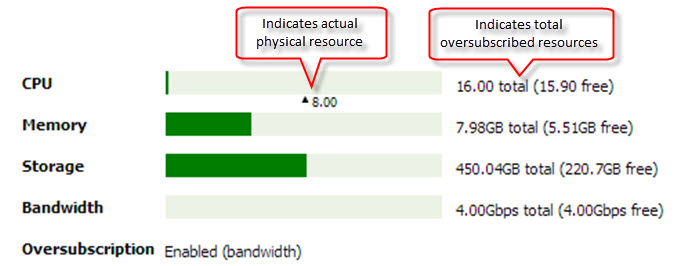
Note: For more information, see System Dashboard in the User Interface Reference Guide.
CA AppLogic now supports Jumbo frames for Xen based grids.
Jumbo Frames allow the NIC to transmit larger size packets (9K vs. 1.5K) thus reducing the number of packets required to transfer a given amount of data. Fewer packets per second means fewer interrupts and less load on the computer resources of a server, therefore better performance with a given amount of compute power.
CA AppLogic automatically enables jumbo frames if all servers on your grid have 10Gb hardware. The Grid Maintainer can also optionally enable and disable the feature via the command line, for both 10G and 1G based Xen grids.
Note: If you have a 10G based Xen grid at an earlier version of CA AppLogic, verify your backbone network switch is properly configured to support jumbo frames (MTU of >9000, follow your specific switch documentation) before you start the grid upgrade CA AppLogic 3.7.
Similarly if you plan to create a 10G based Xen grid with CA AppLogic 3.7, verify that your backbone network switch is properly configured to support jumbo frames (MTU of >9000, follow your specific switch documentation) before you start the grid creation.
Important!
If you have a 10G backbone with jumbo frames not enabled or not available on the switches, you must disable jumbo frames when you create the grid using the Add Grid wizard. On the Controller pane of the Add Grid wizard, for Advanced Setting, click Edit to open the Grid Parameters editor. Specify the grid parameter:
jumbo_frames_mode=disable
Do not enable this feature until you are sure your backbone switch is properly configured to support jumbo frames (otherwise grid creation/upgrade will fail).
Note: For more information, see Grid Parameters Reference in the BFC User Guide.
The following updates to catalogs and applications are included in the GA release:
All appliances and applications have been re-based on CentOS 6.3. The underlying OS on the grid servers and controller have also been re-based on CentOS 6.3.
Note: The filer appliances were upgraded to CentOS 6.3 as part of the 3.5 release.
This provides a more stable and robust underlying OS and capitalizes on the wealth of improvements since the 5.x release of CentOS.
Note: For more information, see the Application Catalog Reference Guide.
New Style Raw Interfaces, also known as MEI or Multiple External Interfaces, was included as a new feature in CA AppLogic 3.5. In this release we have done the following to make this feature easier to use:
Note: For more information, see System Catalog in the Appliance Catalog Reference Guide.
HVM virtual machines now support true read-only access to volumes, allowing these volumes to be properly shared for concurrent access. Limited write capability is provided to the guest OS, so that the OS can mount such volumes (each mount point has its own private, limited write area whose content is discarded on appliance stop).
This further allows concurrent provisioning of multiple instances of HVM appliances (e.g., Windows VDS), even when using different target volume size and/or the block-copy-by-filer performance optimization option.
More grids will now be able to use the block-copy-by-filer option which allows more users to be logged in the grid concurrently without sacrificing concurrent provisioning of Windows appliances.
Note: This feature is only supported on Xen - it does not function on ESX.
The WEB5 appliance from previous releases has been maintained to support backward compatibility.
Note: This appliance will be removed in a future release.
Note: For more information, see System Catalog in the Appliance Catalog Reference Guide.
CA AppLogic now includes support for the following:
Note: ESX only supports Windows 7. Xen supports all Windows versions.
Note: In addition, we provide the application templates and appliance templates for Windows 7, 8 and 2012.
Note: For more information, see the Appliance Developer Guide.
CA AppLogic now supports a maximum of 100 appliances per server, up from 60 in previous GA releases.
Note: For ESX-based grids, the maximum number of appliances per server is limited to 70.
The following improvements have been made to the web user interface:
Web user interface performance has been improved as follows:
Note: For more information, see the User Interface Reference Guide.
This release includes new wizard-based import of virtual machines in OVF format. The import of both Linux and Windows OVF images are supported by this new user interface wizard. In previous versions of CA AppLogic, OVF packages could only be imported using the image2class command.
Users can now create a new class by importing an OVF image using the new Class Creation Wizard. Future releases will support other methods, such as starting from an existing class and branching it, or from an operating system ISO installation image.
The new wizard is used to import an OVF image and to create an unmanaged singleton appliance on a grid. After the Virtual Machine is imported, you can install an APK and make the VM into a managed appliance.
The OVF wizard can be launched from either the Applications tab or from inside the Infrastructure Editor.
Note: For more information, see Class Creation Wizard in the User Interface Reference Guide.
The List of Network Resources in the dashboard can now be sorted by either the “Network” or “VLAN ID” columns.
Previously this sorting was fixed by the “Name” column (which has been re-titled “Network”):

Note: For more information, see the User Interface Reference Guide.
In previous versions of CA AppLogic there was no way to view a large list of VLANS.
In this release, a scroll bar has been added to the Network Resources section of the dashboard if the list is too large to display in a single page.
Note: For more information, see the User Interface Reference Guide.
In this release, graphical elements on the infrastructure editor have been enhanced to allow zooming in and out:
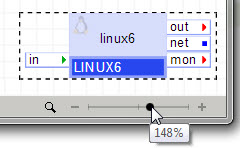
Mouse scroll wheel, zoom-to-object, zoom-to-fit, zoom-to-selection and zoom-to-annotation are supported for quicker zoom navigation. This enhancement also improves load times and retains readability when elements are zoomed above the 100% level.
In this release, appliances now show a visual progress indicator while starting and stopping:
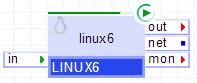
Note: For more information, see Canvas in the User Interface Reference Guide.
You can now access the Cloud Commons Marketplace directly from the CA AppLogic Support page:
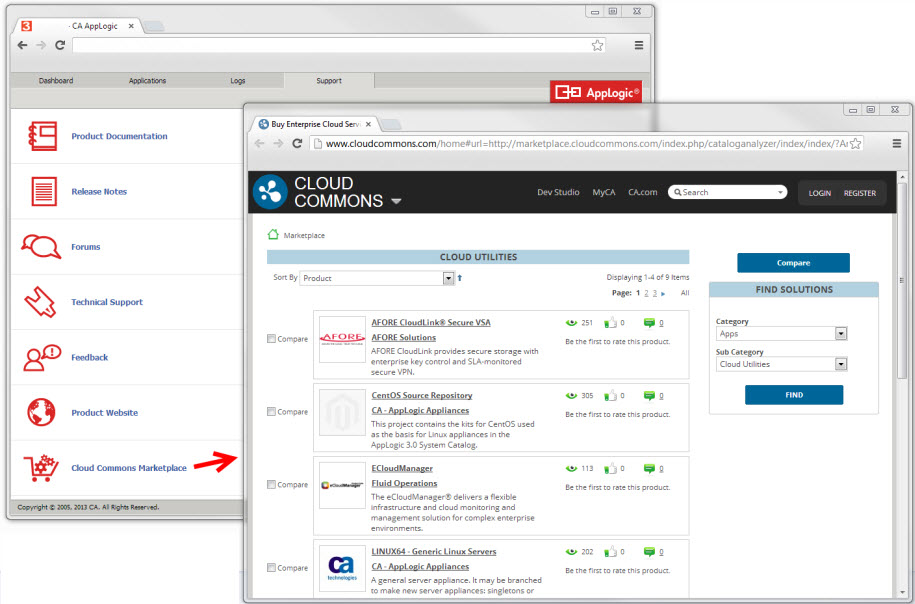
Note: For more information, see Support in the User Interface Reference Guide.
There is a new enhanced version of the Web API v2 application that adds the following new commands:
|
vdc/set |
Set grid configuration parameter(s) |
|
vdc/reboot |
Reboot a grid |
|
vdc/shutdown |
Shut a grid down |
|
vdc/power_cycle |
Power-cycle a grid |
|
srv/shutdown |
Shut a server down |
|
srv/enable?&all |
Enable all servers |
|
srv/disable?&all |
Disable all servers |
|
srv/power_on?&all |
Power on all servers |
|
srv/power_off?&all |
Power off all servers |
|
srv/power_cycle?&all |
Power cycle all servers |
|
app/create?app=name |
Create an empty application (omit template specification) |
|
app/exec?app=name&cmd=command |
Log in an application and run a specified command |
|
comp/exec?app=name&comp=compname&cmd=command |
Log in an application component and run a specified command |
|
vol/relocate |
Relocate volumes to different volume stores or servers within the same grid (in CA AppLogic 3.5, this command was called vol/migrate) |
|
vol/relocate_status |
Report on the state of ongoing volume relocations |
|
vol/migrate |
Migrate volumes between two different grids |
|
vol/migrate_status |
Report on the state of ongoing volume migrations between two different grids |
|
vol/move?app=name&vol=volume&volnew=new-location |
Move a volume to an alternate location |
|
vol/import?app=application&vol=name&target=filename |
Import a volume from a container file on /vol/_impex/ |
|
vol/export?app=application&vol=name&target=filename |
Export a volume to a container file on /vol/_impex/ |
|
util/cloudstore_list?&user_name=...&user_password=... |
Display products that may be downloaded from Cloud Commons |
|
util/cloudstore_get?&user_name=...&user_password=... &order_id=orderID&license_type=... |
Download a product from Cloud Commons |
Note: For more details regarding the Web API commands and syntax, see the Web Service API Reference Guide.
|
Copyright © 2013 CA Technologies.
All rights reserved.
|
|