

You can view the Status, Messages, and Network Resources on the Dashboard.
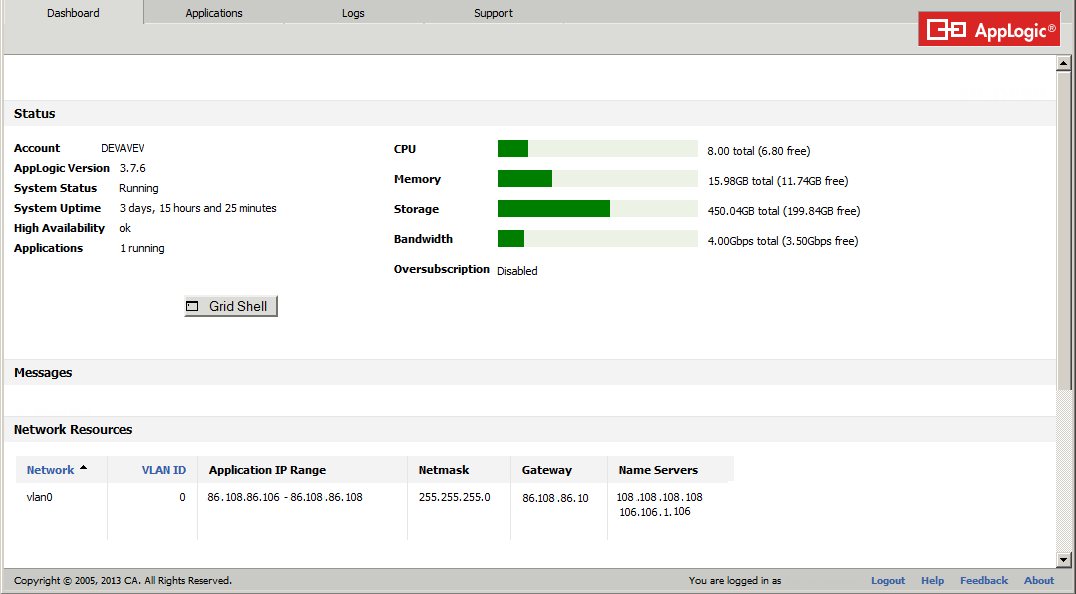
You can view:
In addition, you can view the CPU oversubscription indicator, as applicable. The CPU resource can be over-subscribed to allow a grid to run applications whose CPU allocation exceeds the physical capacity of the grid.
This gives service providers the ability to maximize their margins by controlling the level of CPU oversubscription. CPU oversubscription is used primarily where the appliances are not expected to be under full load all the time and can tolerate lower performance in case all appliances on the server are in use.
When CPU oversubscription is configured, the CPU meter displays the virtual CPU capacity of the grid and an indicator beneath the meter showing the physical CPU capacity of the grid.
Notes:
For additional information on setting oversubscription, refer to grid set in the Grid Control section of the Command Line Shell Reference Guide.
Oversubscription of network bandwidth allows you to start a mix of applications whose network bandwidth requirement exceeds the network bandwidth capacity of the grid. Applications tend not to continually use full capacity of their network interfaces, allowing oversubscription to typically be safe.
Messages
Network Resources
Using the buttons below the grid status, you can perform operations:
Opens a Command Line Shell that allows you to execute commands. See the Command Line Shell Reference for more information.
Deletes the corresponding message when you hover the cursor over a message and click Delete.
Deletes all messages that display on the dashboard.
|
Copyright © 2013 CA Technologies.
All rights reserved.
|
|