

|
|
|
From the Partner role, the Storage Summary page provides you with a snapshot overview of your cloud storage environment and lets you monitor all customer accounts within your master account.
A view of the overall statistics for all customers saved in the CA Cloud and the amount of storage space (GB) each customer is using.
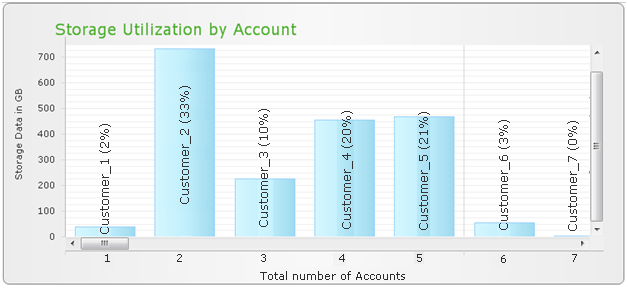
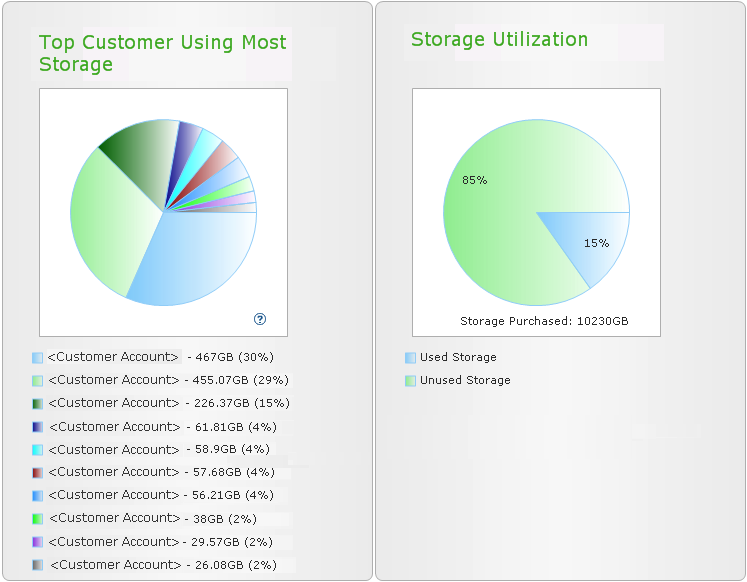
The top customers using the most storage chart shows the top customers within your Partner account that are using the most storage space.
The percentage displayed for each customer is calculated from the total storage space currently being used by all customers (not from the total storage space available for all customers).
Storage Utilization breakdown shows the amount (and percentage) of storage space consumed by all customers compared to the amount of storage space purchased. This is the basis for automatic email alert notifications when the amount of storage space being used reaches the utilization threshold limit and additional storage space may be necessary.
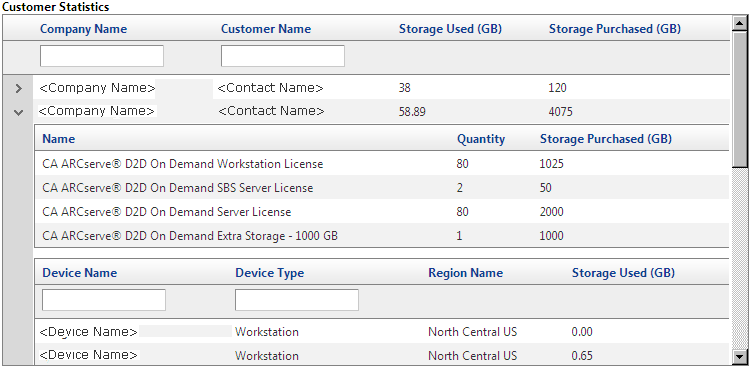
Individual customer account statistics listing the company name, the name of the administrative or management contact for that customer, the amount of storage space used, and the amount of storage space purchased by that customer. Searchable and sortable columns make finding the customer you are looking for easier.
You can click on the arrow next to each company name to expand the details shown and display additional information such as:
| Copyright © 2012 CA. All rights reserved. | Tell Technical Publications how we can improve this information |