

|
|
|
From the Customer role, the Storage Summary page provides you with a snapshot overview of your cloud storage environment and lets you monitor all devices within your account.
The Account Status indicator displays the contract end date, the percentage of the contract time and number of days remaining until the subscription contract expires, and the overall account status (Active or Expired).
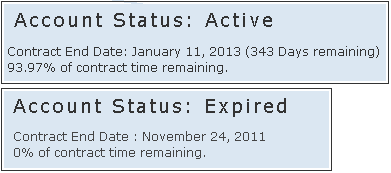
If the current date is before the Contract End Date (even if the amount of purchased storage size has reached its limit), the account status will indicate Active.
If current date has reached the Contract End Date, the account status will indicate Expired.
Note: When predetermined thresholds are reached (for contract expiration date or available storage space), a reminder email notification will be sent.
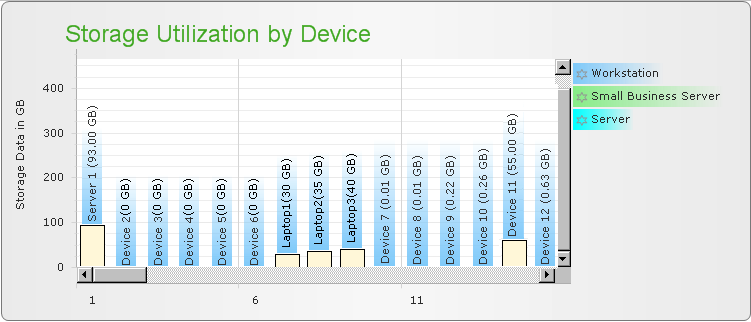
A view of the overall statistics for all devices saved in the CA Cloud and the amount of storage space (GB) each device is using. The statistics display for these devices are color-coded to indicate the type of license each device is consuming.
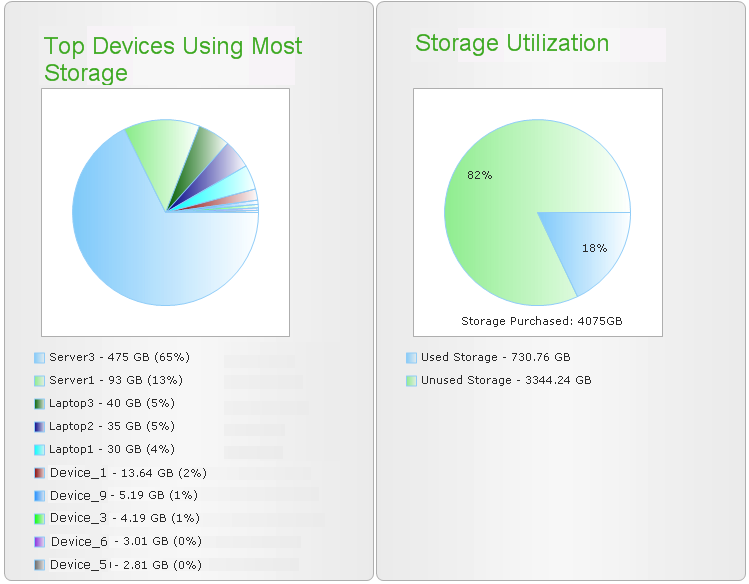
The top devices using the most storage chart shows the top devices within your account that are using the most storage for the subscription. This can be active (enabled) devices or older devices which are not currently active, but still have data saved (disabled or removed).
The percentage displayed for each device is calculated from the total storage space currently being used by all devices (not from the total storage space available).
For example: If the total amount of storage space used by all devices within an account is 1000 GB, and one specific device within that account is using 650 GB of space, then this chart would indicate that 65% of the total used space is being used by this one device.
Storage Utilization breakdown shows the amount (and percentage) of storage space consumed compared to the amount of storage space purchased. This is the basis for automatic email alert notifications when the amount of storage space being used reaches the utilization threshold limit and additional storage space may be necessary.
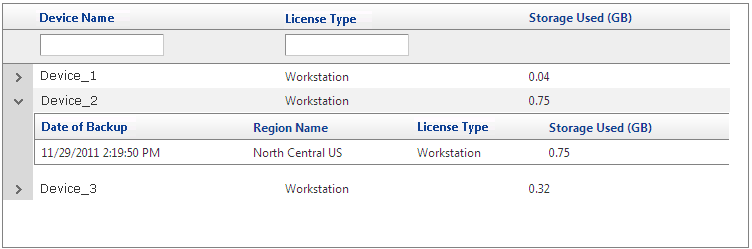
Individual device statistics listing the license types and the last activity for each device registered with the Management Portal. Searchable and sortable columns make finding the device you are looking for easier.
You can click on the arrow next to each device name to expand the details shown and display additional information such as the most recent date and time of the stored file copy, the geographical region where CA Cloud has stored this data, the license type, and the amount of storage space used.
Note: The Date of Backup time is displayed in UTC (Universal Time Coordinated) time. This time is updated by CA Cloud and may be delayed from actual file copy time recorded and displayed by CA ARCserve D2D On Demand.
| Copyright © 2012 CA. All rights reserved. | Tell Technical Publications how we can improve this information |