

Latest version: 2.0.2-1
|
At a Glance |
|
|
Catalog |
System |
|
Category |
Switches |
|
User volumes |
no |
|
Min. memory |
96M |
|
OS |
Linux |
|
Constraints |
no |
L3LB is a switch for distributing incoming TCP/UDP sessions to servers of the same or different type. TCP load balancing functionality is based on the HAProxy TCP/HTTP load balancing software package; UDP load balancing is based on Netfilter.
L3LB load-balances the incoming traffic using several different algorithms. For TCP traffic L3LB performs simple round-robin load-balancing, equalizing the load for the backend servers. For TCP L3LB also supports persistent sessions, binding the client to a particular backend server by using the request source IP address as a key. For UDP traffic, L3LB uses the round-robin algorithm (this is the only algorithm available for UDP traffic).
L3LB constantly monitors the health state of all backend servers. While in TCP mode, the health state checks conducted by L3LB consist of a simple TCP connect check. In the case of a server failure detected by L3LB using the parameterized health check method, L3LB switches the traffic to an alternate server. If the failed server eventually recovers, L3LB may switch the traffic back to the recovered server. For UDP mode an ICMP PING is used to verify availability of a backend server.
L3LB exposes a web service interface on its ctl terminal. This interface allows a user to pragmatically enable/disable output terminals out1 - out8 and also to retrieve the state of all terminals. This is useful in cases when there is some kind of backend failure (that is, such as in a database or storage appliance) where the application itself can automatically disable traffic to a specific set of servers. In this case, L3LB itself is unable to detect this type of failure; so it is up to the application to detect the failure and disable the corresponding set of backend servers.
L3LB is designed to be extremely fast using very few resources. Under regular conditions, L3LB consumes about 25KB of memory for every session, or 1GB for 40000 simultaneous sessions, and processes up to 6000 requests per second.
Resources
|
Resource |
Minimum |
Maximum |
Default |
|
CPU |
0.1 |
16 |
0.4 |
|
Memory |
96 MB |
32 GB |
96 MB |
|
Bandwidth |
1 Mbps |
2 Gbps |
250 Mbps |
The amount of memory given to L3LB does not increase the throughput or response time. L3LB is a CPU/bandwidth bound appliance.
Terminals
|
name |
dir |
prot. |
description |
|
in |
in |
Any |
Common input. TCP requests sent to in are directed to one of the outputs, either using round-robin selection or source-based session information. |
|
ctl |
in |
HTTP |
Control terminal that is used for enabling/disabling the outputs and retrieving output terminal state. |
|
out1-out8 |
out |
Any |
Balanced outputs. Any and all of these outputs can be left unconnected; traffic is distributed only to connected, enabled outputs. By default, all terminals are enabled. |
|
mon |
out |
CCE |
Used to send performance and resource usage statistics. |
Properties
General properties
|
name |
type |
description |
|
mode |
String |
Specifies the mode of operation. Valid values are: |
|
ports |
String |
A space or comma delimited list of ports and port ranges that L3LB forwards to backend servers. Port ranges are specified as a lower_port:higher_port with dash ("-") or colon (":") as a separator between them. Example: 80,81,90-99 110:120 140 141. Traffic received to unspecified port is dropped. |
|
max_connections |
integer |
The maximum number of concurrently active connections that L3LB can handle. When this number is reached, new connections are still accepted, but their processing is delayed until another connection is closed. Upon appliance start, L3LB automatically determines the maximum number of connections based upon available memory, compares it to the value of this property and uses the lowest value. If this property is 0 then the computed value is used. Neither the available memory nor an explicit setting of this property have a direct effect on the balancer's throughput or its maximum request rate - setting a low number (or having little memory) affects response only if the backend servers are performing lengthy operations for each request (for example, database searches), causing many requests to remain open at the same time. This property is only valid for tcp_roundrobin and tcp_source modes of operation. |
|
backup_outputs |
String |
A space or comma delimited list of outputs ( out1 - out8 ) that are considered backup servers. Output ranges (out1-out3) are NOT supported. Traffic is directed to the backup servers only if all backend servers are unavailable. The purpose of these backup servers is to notify clients that something is wrong or redirect them, instead of throwing errors from unavailable backend servers or timing out. Example: out1,out2,out3. If empty, no backup servers are used. |
Health check properties
A simple TCP connect to the first port specified in the ports property is used for tcp_roundrobin and tcp_source modes of operation. ICMP ping is always used in the udp_roundrobin mode of operation.
|
name |
type |
description |
|
healthcheck_interval |
Int |
Interval between health checks; specified in seconds. No health check is performed if this property is 0. |
Timeout properties
These properties are only valid for tcp_roundrobin and tcp_source modes of operation.
|
name |
type |
description |
|
client_timeout |
Int |
Timeout in seconds for waiting for a request from a client after establishing the connection. |
|
server_timeout |
Int |
Timeout in seconds for waiting for a reply from a backend server after establishing the connection. |
|
conn_timeout |
Int |
Timeout in seconds for establishing any TCP connection from within L3LB through one of its terminals (this includes the health checks). Note that when L3LB is under heavy network load, the health checks may incorrectly time out in cases where this setting is set to a very low value (in such cases L3LB will start to disable outputs which may result in unexpected application operation). It is not recommended to set this property to a value lower than 20 seconds. |
Web service interface properties
|
name |
type |
description |
|
ctl_port |
Int |
Port that is used to access the web service control interface through the ctl terminal. |
Custom Counters
The L3LB appliance reports the following custom counters through the mon terminal.
The following counters belong to the L3LB counter group. X may have a value from 1 to 8.
|
Counter name |
Description |
|
outX_status |
State of output terminal outX: 0 - enabled and up, 1 - enabled and down, 100 - disconnected. |
|
outX_queue |
Number of queued requests for terminal outX. This counter is not reported while in udp_roundrobin mode. |
|
outX_queue_max |
Historical maximum of simultaneously queued requests for terminal outX. This counter is not reported while in udp_roundrobin mode. |
|
outX_sessions |
Number of active sessions for terminal outX. |
|
outX_sessions_max |
Maximal number of active simultaneous sessions for terminal outX. |
|
outX_sessions_total |
Number of completed sessions for terminal outX. This counter is not reported while in udp_roundrobin mode. |
|
outX_errors |
Number of failed health checks for terminal outX. |
|
queue |
Current queue length, cumulative for out1 - out8. This counter is not reported while in udp_roundrobin mode. |
|
queue_max |
Historical maximum of simultaneously queued requests, cumulative for out1 - out8. This counter is not reported while in udp_roundrobin mode. |
|
sessions_active |
Number of active sessions, cumulative for out1 - out8. |
|
sessions_max |
Historical maximal number of active sessions, cumulative for out1 - out8. |
|
sessions_total |
Number of completed sessions, cumulative for out1 - out8. This counter is not reported while in udp_roundrobin mode. |
|
errors |
Total number of health check failures, cumulative for out1 - out8. |
Performance
Request Rate
L3LB routes no less than 6000 transactions (request/response pairs) per second, subject to document size and network bandwidth available.
Data Throughput
L3LB routes no less than 15 MBytes/second
Concurrent Connections
L3LB supports no less than 2000 concurrently pending requests. (A pending request being an open TCP connection from the client, on which there is one or more un-completed TCP sessions in progress). Maximum amount of concurrent connections depends of available free memory and may be as high as 40000. L3LB was tested to support more than 15000 of simultaneous active transfers.
Error Messages
In case of appliance startup failure, the following errors may be logged to the system log:
|
Error message |
Description |
|
Error: unable to determine appliance memory configuration, please contact CA Technologies support. |
L3LB failed to detect amount of available memory, please contact CA support. |
|
Error: failed to create the HAProxy config file, please contact CA Technologies support. |
L3LB failed to create the HAProxy config file, please contact CA support (possibly due to low diskspace). |
|
Error: failed to determine number of available CPUs, please contact CA Technologies support. |
L3LB failed to detect amount of available CPUs, please contact CA support. |
|
Error: invalid operation mode specified |
Invalid mode specified, it should be one of tcp_roundrobin, tcp_source or udp_roundrobin |
|
Error: ctl_port value must be between 1 and 65535. |
ctl_port value must be more than 1 and less than 65535. |
|
Error: failed to start L3LB, please see '/var/log/appliance/log' log file for details. |
A system error occurred while starting L3LB, please contact CA support. |
|
Error: failed to initialize the control web service interface, please contact CA Technologies support. |
A system error occurred while initializing the control web service interface exposed on the ctl terminal, please contact CA support. |
|
Error: failed to initialize statistics reporting, please contact CA Technologies support. |
A system error occurred while initializing statistics reporting, please contact CA support. |
|
Error: failed to initialize the user interface terminal, please contact CA Technologies support. |
A system error occurred while initializing the graphical user interface exposed on the ui terminal, please contact CA support. |
Overview
A control web service interface is exposed on the ctl terminal (on the configured port), allowing for the enabling and disabling of the output terminals (out1 - out8) and retrieving the current terminal state.
Protocol
The protocol only uses the GET HTTP method, as it only provides reading functionality. Thus, every supported type of protocol request can be defined by means of its URI and the output structure. Characters, that are considered special for the URI should be escaped via the standard %-encoding.
Below is a description of all supported URIs.
Control Calls
Disabling output terminals
There are two separate formats of the disable control call, based on how the output terminal is identified:
Request: /api/disable?channel=out3 (disables the output terminal out3)
Request: /api/disable?10.11.12.13 (disables the output terminal that is connected to the web server with the IP address of 10.11.12.13)
Response:
L3LB returns the following structure with a status code and optional status message:
{
   "status" :
   {
   "code": code_value,
   "message": "status_message"
   }
}
Possible status code values are listed below:
|
Code value |
Description |
|
0 |
Operation was successful, terminal was disabled. |
|
10 |
Operation was not successful, L3LB configuration was not modified. The most probable causes are that the terminal is already disabled or the specified IP address is invalid. |
|
100 |
An error occurred while processing the request, more details are available in the status message. |
Enabling Output Terminals
There are two separate formats of the enable control call, based on how the output terminal is identified:
Request: /api/enable?channel=out3 (enables the output terminal out3)
Request: /api/enable?10.11.12.13 (enables the output terminal that is connected to the web server with IP address of 10.11.12.13)
Response:
L3LB returns the following structure with a status code and optional status message:
{
   "status" :
   {
   "code": code_value,
   "message": "status_message"
   }
}
Possible status code values are listed below:
|
Code value |
Description |
|
0 |
Operation was successful, terminal was enabled. |
|
10 |
Operation was not successful, L3LB configuration was not modified. The most probable causes are that the terminal is already enabled or the specified IP address is invalid. |
|
100 |
An error occurred while processing the request, more details are available in the status message. |
Retrieving Output Terminal State
Request: /api/status (returns the state of all output terminals)
Response:
L3LB returns the following structure with a status code and optional status message:
{
   "status" :
   {
   "code": code_value,
   "message": "status_message",
   "terminal_id": "terminal_state",
   "terminal_id": "terminal_state",
   ...
   }
}
State is returned only for all connected terminals; state for disabled and disconnected terminals is not reported.
Possible status code values are listed below:
|
Code value |
Description |
|
0 |
Operation was successful. |
|
100 |
An error occurred while processing the request, more details are available in the status message. |
Possible terminal values are out1 - out8.
Possible state values are:
|
State value |
Description |
|
up |
Terminal is connected and active. |
|
down |
Terminal is inactive. The web server that is connected to this terminal it is either down or failed the L3LB health check. |
An example state output:
{
   "status" :
   {
   "code": 0,
   "message": "",
   "out1": "up",
   "out2": "up",
   "out3": "down",
   "out4": "up"
}
Load-balancing Webmail Clusters
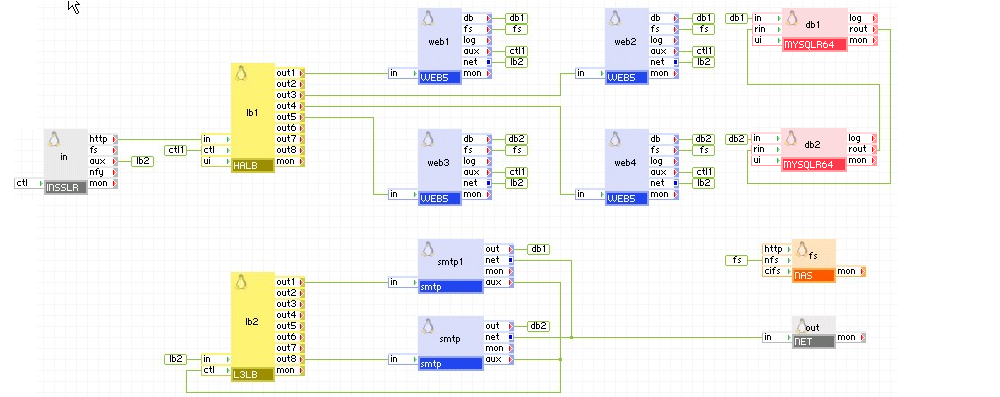
Email has become an important part of the business processes nowadays, so webmail clusters must be available 24 hours a day, 7 days a week. The example below shows how HALB and L3LB can be used together to load balance and increase availability of webmail and smtp servers. In case of failure, servers can disable outputs of HALB or L3LB through the ctl interface. The L3LB tcp_roundrobin mode is used in this case.
Load-balancing Application Servers
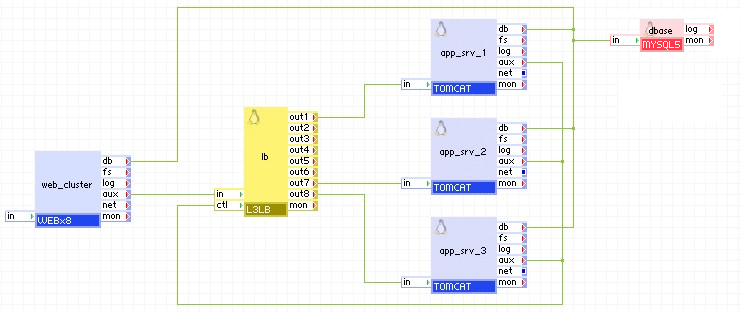
Rarely a modern website serves only static content. Usually a lot of server-side processing occurs on the server side. This example diagram demonstrates a way to load balance uninterrupted access from a cluster of web servers to a number of application servers; Apache Tomcat in this case. tcp_source mode of operation helps ensure proper web server to application server session support.
Load-balancing Voice-over-IP Services
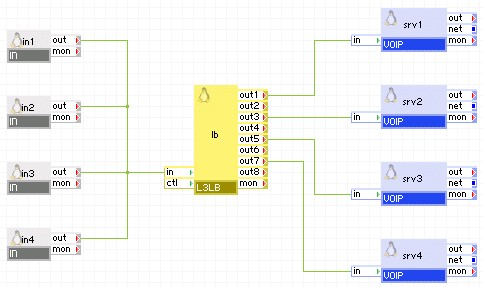
Common Voice Over IP protocols use UDP as a main protocol; load balancing such traffic is a crucial task for easy scaling of a VoIP cluster. In this example, the udp_roundrobin mode of operation is used.
Open source and 3rd party software used inside of the appliance
L3LB uses the following 3rd party open source packages in addition to the 3rd party open source packages used by its base class LUX5.
|
Software |
Version |
Modified |
License |
Notes |
|
haproxy |
1.2.18 |
No |
GPLv2 |
homepage |
|
libxml2 |
2.6.26 |
No |
MIT |
N/A |
|
php-thttpd |
2.25b |
No |
BSD |
N/A |
|
libipt_statistic |
1.3.5-1.2.1 |
No |
GPLv2 |
homepage |
|
iptables |
1.3.5-1.2.1 |
No |
GPLv2 |
homepage |
Base Class
The LUX5 appliance image is used as the base class for L3LB appliance.
Class Volumes
No disk resizing is needed, the L3LB is using the defaults defined for the base LUX5 class.
Contents of the L3LB Directory
L3LB software is installed under the /appliance subtree.
udp_healthchecker.pl health check script for udp mode of operation.
Packages
The following standard packages (from the official mirror) are installed:
Additionally, the following custom packages are installed (sources included).
Exported appliance image:
Sources:
Tests (see the test plan CatSwitchesL3LBTp and the release notes CatSwitchesL3LBRelNotes):
l3lb-24-test.1.0.0.tar.bz2 - test scripts for CA 3Tera AppLogic 2.4
Theory of Operation
L3LB utilizes a single background service - the HAProxy TCP/HTTP load balancer (http://haproxy.1wt.eu). For the purpose of tcp load balancing, only the TCP mode of operation is enabled.
A number of listeners and backends are defined in the haproxy.cfg config file, which is created by the appliance.sh script upon appliance start, using the configured property values. One listener is created for the in terminal, and is used for all incoming network traffic that needs to be load balanced. Another listener is created on the ui interface for the purpose of exporting the statistics GUI to the user. An additional listener is created on the internal loopback interface lo0 for the purpose of extracting the runtime statistics and reporting them through the mon terminal. Every connected outX terminal is defined as a backend where incoming traffic may be forwarded.
The listener on the in terminal receives an HTTP request and depending on the mode of operation, modifies the cookie in the passive, insert and sync modes. The request is then forwarded to one of the backend servers. If there is an existing session for this request, it is forwarded to the same backend server for all previous requests. If there is no existing session for this request, the backend server is selected by round-robin. The response from the server is again possibly modified and forwarded back to the client.
Configuration
The configuration file for HAProxy is generated at startup by the appliance.sh init script. It uses the properties defined in /etc/applogic.sh and uses them to create an /appliance/haproxy.cfg config file. A number of additional properties that are calculated at start time are written into the config file (ulimit-n, nbproc, bind address).
Log Files
The request logging is disabled in L3LB, only critical errors are reported into the system log (other then this, there is no logging).
Open source and 3rd party software used inside of the appliance
L3LB uses the following 3rd party open source packages in addition to the 3rd party open source packages used by its base class LUX5.
|
Software |
Version |
Modified |
License |
Notes |
|
haproxy |
1.4.9 |
No |
GPLv2 |
homepage |
|
php-thttpd |
2.25b |
No |
BSD |
N/A |
|
libipt_statistic |
1.3.5-1.2.1 |
No |
GPLv2 |
homepage |
|
iptables |
1.3.5-5.3.el5_4 |
No |
GPLv2 |
homepage |
|
Copyright © 2011 CA.
All rights reserved.
|
|