

Latest Version: 2.0.2-1
|
At a Glance |
|
|
Catalog |
System |
|
Category |
Switches |
|
User volumes |
no |
|
Min. memory |
96M |
|
OS |
Linux |
|
Constraints |
no |
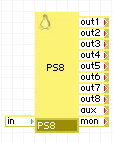
PS8 is a switch for distributing TCP and UDP traffic to different outputs depending on the incoming request's protocol and port number. PS8 is parameterized to recognize specific protocols and ports for requests received on its in terminal. The recognized incoming traffic is forwarded through the specified output terminal based upon PS8's parameterization. Optionally, the forwarded traffic's port may be overridden by PS8. For example, PS8 can be used to forward all incoming TCP traffic on port 80 through the out5 output terminal on port 8080.
The switch is cascadable; incoming traffic that is not TCP, UDP or does not match the parameterized port numbers is forwarded through the aux terminal without modification. All incoming traffic received on the outX and aux terminals is forwarded back through the in terminal.
PS8 is typically used to route incoming traffic to different appliances within an application.
Resources
|
Resource |
Minimum |
Maximum |
Default |
|
CPU |
0.05 |
4 |
0.05 |
|
Memory |
96 MB |
128 MB |
96 MB |
|
Bandwidth |
1 Mbps |
2 Gbps |
200 Mbps |
Terminals
|
name |
dir |
prot. |
description |
|
in |
in |
Any |
Common input. Traffic sent to in is directed to one of the outputs, based on the protocol and port number |
|
out1-out8 |
out |
Any |
Configured outputs. The traffic that is forwarded through a particular output is configured through the appliance properties. Any and all of these outputs can be left unconnected; traffic directed to unconnected outputs is discarded. |
|
aux |
out |
Any |
Cascade output. Incoming traffic that is not directed to any of the out1-out8 outputs is sent through this terminal. Also, any IP traffic that is not TCP or UDP (that is, does not have port numbers) is also sent through this terminal. This terminal can be left unconnected |
|
mon |
out |
CCE |
Sends performance and resource usage statistics. This terminal may be left unconnected if not used. |
Properties
|
name |
type |
description |
|
outX_protocol |
string |
IP protocols to forward to output outX. Allowed values are: none, tcp, udp, both. Default is none (forwarding disabled). |
|
outX_in_port |
string |
Incoming requests that contain these specified ports are forwarded through outX. Port ranges are specified as lower_port:higher_port with semicolon or dash as a separator. More than one port or port ranges may be specified by using comma or space separaters (that is, 80,100 80-90 91:100). Single ports can be listed by number or by their common name (e.g., http), port ranges must be specified using port numbers only. Default is empty (no forwarding); if a protocol is specified for the output, this property must be set to a non-empty value. |
|
outX_out_port |
string |
Output port to which to forward traffic. If left empty, the output port is the same as the input port. This property allows for easy recoding (e.g., port 8080 to port 80). If the input port is specified as a list or a range, this property must be left empty. Output ports can be specified either as a number (for example, 80) or as port name (for example, http). Default: empty (same as input). |
Error Messages
The following messages may appear in either the appliance log file or the system log of the grid controller when the appliance fails to start:
Failed to start Port Forwarding, some of the output terminals has out_port set without in_port
The following diagram shows a typical usage of the PS8 appliance in a small Lamp Cluster application:
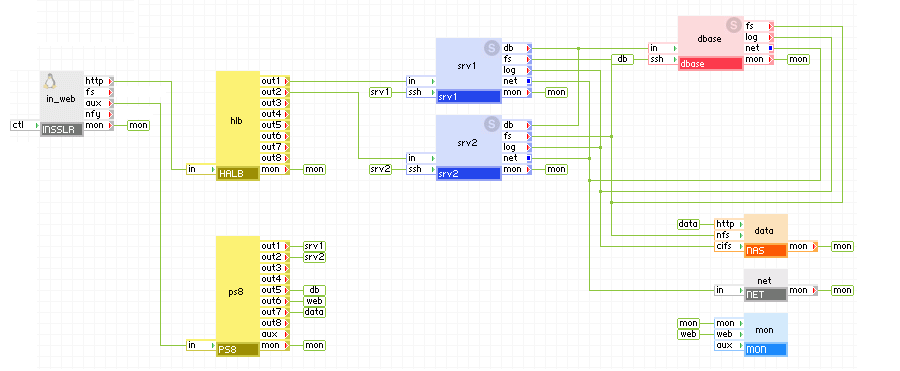
Appliances in use:
HTTP requests arrive on the in_web gateway. The gateway forwards the requests to the halb load balancer, which forwards them to one of the web servers.
SSH requests arrive on the in_web gateway. The gateway forwards the requests through its aux terminal to the port switch which maps the incoming port to port 22 and forwards the request the appropriate component based on the incoming port number.
Example PS8 property configuration
|
Property Name |
Value |
|
out1_protocol |
tcp |
|
out1_in_port |
2222 |
|
out1_out_port |
22 |
|
out2_protocol |
tcp |
|
out2_in_port |
2223 |
|
out2_out_port |
22 |
|
out5_protocol |
tcp |
|
out5_in_port |
2224 |
|
out5_out_port |
22 |
|
out6_protocol |
both |
|
out6_in_port |
2225 |
|
out6_out_port |
80 |
|
out7_protocol |
both |
|
out7_in_port |
2226 |
|
out7_out_port |
80 |
(See also the Application Catalog Reference Guide)
The amount of memory given to PS8 does not affect its throughput.
Open source and 3rd party software used inside of the appliance
PS8 uses the following 3rd party open source packages in addition to the 3rd party open source packages used by its base class LUX5.
|
Software |
Version |
Modified |
License |
Notes |
|
iptables |
1.3.5-4 |
No |
GPLv2 |
homepage |
|
Copyright © 2011 CA.
All rights reserved.
|
|