

Important! CA Federated SDK sample source code is provided to users for creating and deploying alternate custom adapters. However, CA Support will not provide support to write the actual custom code. We do not actively support the creation and deployment of additional adapters beyond the SDK source code samples shipped with the CA Service Desk Manager Application.
The CA Federated Search SDK architecture is designed for extensibility. The SDK contains all the necessary JAR files to develop a custom adapter. Sample Eclipse projects can be imported, and Ant build targets are also provided to build custom search adapters. The SDK is located in the CA SDM directory:
$NX_ROOT\samples\sdk\fedsearch\adapters-source.tar.gz
The source code of the following adapters can be used to write additional custom adapters:
Note: Source code for the CAFedSearch servlet, its underlying framework, and the security filter are not provided. No source code is provided for any of the Crawler Surface components.
The SDK component is written in java and is shared as a jar file (cafedsearch-adapter-sdk-1.0.0.jar). The SDK provides a simple interface to enable customers to develop and deploy their own search adapters.
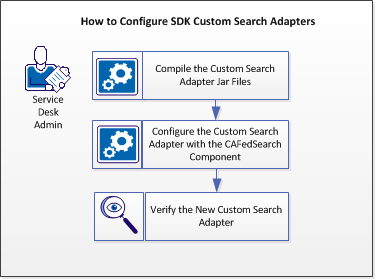
Follow these steps:
Compile the custom adapter jar files successfully.
Follow these steps:
This jar file is available in the CA SDM directory:
%NX_ROOT%\java\lib\CXF\
This file is available in the directory:
%NX_ROOT%\bopcfg\www\CATALINA_BASE_FS\webapps\cafedsearch\WEB-INF\lib
This file is available in the directory:
%NX_ROOT%\bopcfg\www\CATALINA_BASE_FS\webapps\cafedsearch\WEB-INF\lib
This file is available in the directory:
%NX_ROOT%\java\lib
search
The CAFedSearch component invokes and passes search method parameters. These parameters are embedded inside the SearchOptions parameter for each search request from the client.
Note: Ensure that your implementation is thread safe as the CAFedSearch component maintains only one instance of the Java Class. For each search operation, search method is invoked on the same instance.
Specifies the method for retrieving the search string.
Specifies the start index method, the number from which the client wants to search items. Index starts from 1.
Specifies the maximum number of search results that the client expects.
Note: You can also use other Java Class methods. For example: getUserId()
Note: For information about Java Class Methods, see Java Documentation.
Specifies the name of the search adapter. Names are case-sensitive and must match exactly with the name that is provided in the utility configuration file. For convenience, SearchAdapter provides a method getName() which should be used.
For example:
results.setSources(getName());
Specifies the total search result count.
Specifies a start index of results. This value is as per results from your search engine.
results.setStartIndex(startIndex);
Note: For more information about ResultCollection Java class, see the Java documentation.
Specifies a method for setting the search result actual content.
Specifies a method for setting the HTML (can contain the HTML tags) content. If the search engine gives HTML highlighted, then set the highlighted text using this method.
Note: If your search engine does not have this feature, you can write a simple Java class method to highlight the text. The CA Open Space adapter has a simple method to bold terms in the search results.
A method to setting an HTML title (can contain the HTML tags).
A method to set a plain title (cannot contain the HTML tags).
A method to set the source attribute. A typical invocation would be an item setSource(getName());
Note: If the search adapter requires more jar files, customize the build.xml to compile and prepare an adapter jar file. Ant binaries are required to use the build.xml. Use Ant to run the targets in build.xml to compile and make the JAR files Keep the build.xml along with your source (src) folder. The build.properties file is optional. For more information about Ant binaries, see Ant Help.
The jar file is successfully compiled.
Configure the new search custom adapter jar file with the CAFedSearch Component for creating the CA SDM search sources.
Follow these steps:
%NX_ROOT%\bopcfg\www\CATALINA_BASE_FS\webapps\cafedsearch\WEB-INF\lib
$NX_ROOT\sample\cafedsearch\
<?xml version="1.0" encoding="UTF-8"?>
<beans default-autowire="byName" xsi:schemaLocation="http://www.springframework.org/schema/beans
http://www.springframework.org/schema/beans/spring-beans-2.5.xsd
http://cxf.apache.org/core
http://cxf.apache.org/schemas/core.xsd
http://cxf.apache.org/jaxrs
http://cxf.apache.org/schemas/jaxrs.xsd" xmlns:cxf="http://cxf.apache.org/core"
xmlns:jaxrs="http://cxf.apache.org/jaxrs"
xmlns:xsi="http://www.w3.org/2001/XMLSchema-instance"
xmlns="http://www.springframework.org/schema/beans">
<bean autowire="autodetect"
class=" com.abc.xyz.XYZAdapter "
id="XYZAdapterConfiguration" scope="singleton">
<property name="username" value="$(xyz_username)"/>
<property name="password" value="$(xyz_password)"/>
</bean>
<bean autowire="autodetect" class="com.abc.xyz.XYZAdapter" id="XYZSearchAdapter" init-method="init" destroy-method="destroy" depends-on="XYZAdapterConfiguration">
<property name="config" ref="OpenSpaceAdapterConfiguration" />
</bean>
</beans>
Add xyz_username and xyz_password in the adapters.properties file and provide values to the property.
fs_adapters_cli -i -k XYZ -b XYZSearchAdapter -t "XYZ-tmpl.xml " -o "xyz.xml
$NX_ROOT\samples\cafedsearch\WEB-INF
pdm_tomcat_nxd -c STOP -t FS
pdm_tomcat_nxd -c START -t FS
For more information about federated search sources, see Create the Federated Search Sources in CA SDM.
The new custom search adapter is successfully configured with the CAFedSearch component.
Verify the functionality of your new custom search adapter by using the REST client.
Follow these steps:
http://sdmhostname:<FS_Tomcat_Port>/cafedsearch/sdm/search?q=search&userid=<sdmuserid>&source=<Adapter Name>
$NX_ROOT\bopcfg\www\CATALINA_BASE_FS\webapps\cafedsearch\WEB-INF\beans.xml
Note: Turning off the security filter is not recommended in a production environment. Turn off the Security filter in a test environment for verifying the new custom search adapter functionality.
|
Copyright © 2013 CA.
All rights reserved.
|
|