

The server can propagate dueout times, up-stream, to all predecessors of a job that has a dueout time. The server sets the dueout times of predecessors based on historical average elapsed times, a job's execution time averaged over previous runs. By using dueout propagation, you can avoid specifying dueout times for all jobs in an Application.
The server propagates dueout times when it generates the Application. The following actions affect how the server propagates dueout times in an active Application:
In all cases, the server stops propagating dueout times when it reaches a complete or bypassed predecessor.
Note: The server uses the earliest dueout time when there is a conflict propagating times to a job.
Example: Propagation of Dueout Times
Suppose that PAYJOB6 should start by 7 a.m. PAYJOB6 has an average elapsed time of one hour.
The following illustration displays the relationship between all the jobs:
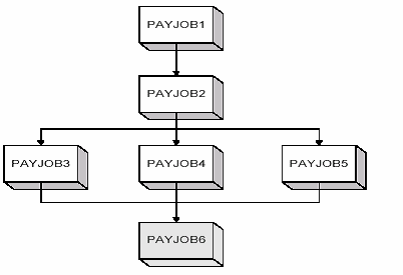
When the server generates the Application, it sets late end times for all predecessor jobs, PAYJOB1 through PAYJOB5, based on their historical average elapsed times and the late start time of PAYJOB6. If any job in the preceding Application ends late, the server marks the job with an Overdue condition. If you set up a notification in the Application definition for overdue processing, the server sends a notification whenever a job becomes overdue.
In this example, PAYJOB6 has a late start time of 7 a.m., which means PAYJOB3, PAYJOB4, and PAYJOB5 must end by 7 a.m. If PAYJOB3, PAYJOB 4, and PAYJOB5 each have an average elapsed time of one hour, then they will each have a late start time of 6 a.m., and PAYJOB2 will have a late end time of 6 a.m. If PAYJOB2 has an average elapsed time of two hours, then PAYJOB2 will have a late start time of 4 a.m., and PAYJOB1 will have a late end time of 4 a.m. If PAYJOB1 has an average elapsed time of 30 minutes, then PAYJOB1 will have a late end time of 3:30 a.m.
The following table compares the late start times and end times of all jobs if PAYJOB6 has a late start time of 7am or a late end time of 9am:
|
Job |
Average Elapsed Time |
If PAYJOB6 has a late start time of |
If PAYJOB6 has a late end time of |
||
|---|---|---|---|---|---|
|
Late start time |
Late end time |
Late start time |
Late end time |
||
|
PAYJOB1 |
30 minutes |
3:30 a.m. |
4 a.m. |
4:30 a.m. |
5 a.m. |
|
PAYJOB2 |
2 hrs |
4 a.m. |
6 a.m. |
5 a.m. |
7 a.m. |
|
PAYJOB3 |
1 hr |
6 a.m. |
7 a.m. |
7 a.m. |
8 a.m. |
|
PAYJOB4 |
1 hr |
6 a.m. |
7 a.m. |
7 a.m. |
8 a.m. |
|
PAYJOB5 |
1 hr |
6 a.m. |
7 a.m. |
7 a.m. |
8 a.m. |
|
PAYJOB6 |
1 hr |
7 a.m. |
8 a.m. |
8 a.m. |
9 a.m. |
|
Copyright © 2014 CA Technologies.
All rights reserved.
|
|