

The Virtual Volumes object displays all the information about a MVS defined volume in a CA Vtape system. You can display the Virtual Volumes object to view information about your Virtual Volumes activity. You can also perform actions on Virtual Volumes using this object's Action options.
To display Virtual Volumes information
CA Vtape objects are displayed in the Object Tree.
The table view of the Virtual Volumes object appears, as shown in the following sample:
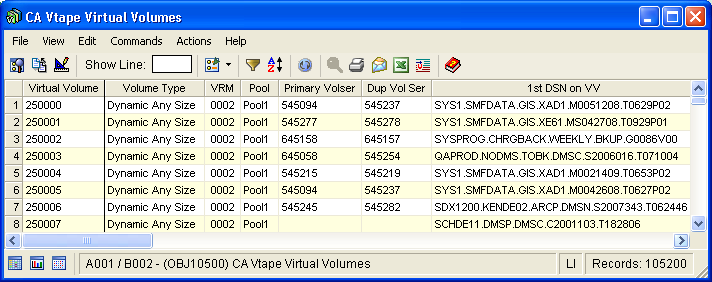
Note: Click the Help About Object tool bar icon ( ), to display a description of the field values displayed in the columns in the Virtual Volumes object.
Virtual Volumes Object Actions Menu
The following actions are available from the Actions menu option located on the Virtual Volumes object view Menu Bar:
Adds a Virtual Volume range to CA Vtape. These are the actual tape volumes reserved in the tape management system for CA Vtape to use. A range can be from 100 volumes to 100,000 volumes. You will be prompted to provide the starting and ending volume serial numbers of the range.
Parameters are as follows:
Beginning Virtual Volume of the range to be added. All 6 characters of the volume serial are required, and at least the final 2 characters should be 00 depending on the number of volumes to be added.
Ending Virtual Volume of the range to be added. All 6 characters of the volume serial are required, and at least the final 2 characters should be 99 depending on the number of volumes to be added.
Deletes the specified range of Virtual Volumes from CA Vtape. The range can vary in size from 100 to 100,000 volumes. All of the Virtual Volumes in the range are validated to be in scratch status and portions of the range may not be deleted if not all volumes are scratched.
Activates write protection for the Virtual Volume segment identified by the selected Virtual Volume. All 100 of the volumes associated with this segment will be write protected.
Inactivates write protection for the Virtual Volume segment identified by the selected Virtual Volume. All 100 of the volumes associated with this segment will have write protection removed.
Looks for any Group Write Requests (GRRs) matching the selected Virtual Volume and dequeues those GRRs.
Activates write protection for the selected Virtual Volume.
Inactivates write protection for the selected Virtual Volume.
Initiates recall processing for the virtual volume selected. This should be differentiated from Recall VVO in that this process will cause the Virtual Volume to be recalled into cache even if a copy already exists.
Stops recall processing for the selected Virtual Volume recall.
|
Copyright © 2013 CA Technologies.
All rights reserved.
|
|