

The Virtual Device Activity object is a real time view of the Virtual tape devices being used by CA Vtape. The Virtual Device Activity object is useful for monitoring the status of Virtual tape devices. You can also perform actions on virtual devices using this object's Action options.
To display Group Status activity
CA Vtape objects are displayed in the Object Tree.
The table view of the Virtual Device Activity object appears, as shown in the following sample:
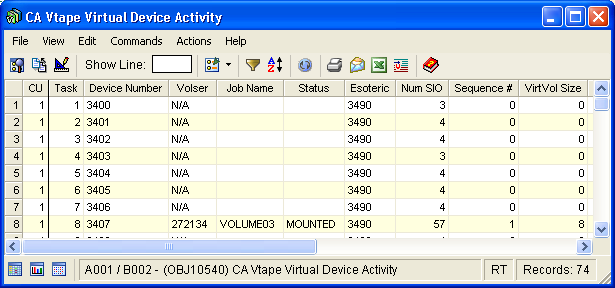
Note: Click the Help About Object tool bar icon ( ), to display a description of the field values displayed in the columns in the Virtual Device Activity object.
Virtual Device Activity Object Actions Menu
The following actions are available from the Actions menu option located on the Virtual Device Activity object view Menu Bar:
The MOUNT command will re-mount the previously mounted virtual volume and the recall will be re-initiated. There are a few instances when a mount pending condition arises and the SVTSVTU task does not initiate the mount, that is, CA Vtape is forced down while a recall from a physical tape is taking place. When CA Vtape is restarted the virtual device associated with the recall will be kept active with a mount pending condition. The MOUNT command will re-mount the previously mounted virtual volume and the recall will be re-initiated.
Emulates the Power OFF/Power ON of a real tape device. It stops the activity executing in the specified Virtual Device, terminates the subtask and restarts it.
Emulates the Power OFF/Power ON of a real tape control unit. It stops all Virtual Device activity for the specified Virtual Control Unit, shuts down the corresponding SVTSAS address space and automatically starts it again.
The following options are available from MIH Clear:
Conditionally turns off the device busy bit so that IBM's Missing Interrupt Handler (MIH) can initiate recovery action for a Virtual Device. You must issue the command once for each pending I/O against the Virtual Device. If there are five pending I/Os, you need to issue the command five times. Because there is no quick way of determining the number of pending I/Os waiting on a device, you should not issue the command until the SVTnR3424E message is issued.
Same as No Dump, however this action will also initiate a dump of the related areas for diagnostic purposes.
|
Copyright © 2013 CA Technologies.
All rights reserved.
|
|