

The Group Status object contains all the status information about the CA Vtape Groups. The Group Status object is useful for monitoring the status of Groups. You can also perform actions on groups using this object's Action options.
To display Group Status activity
CA Vtape objects are displayed in the Object Tree.
The table view of the Systems object appears, as shown in the following sample:
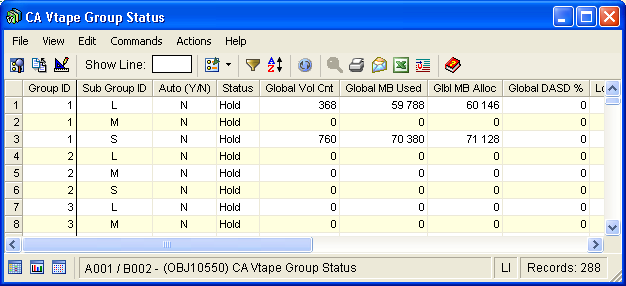
Note: Click the Help About Object tool bar icon ( ), to display a description of the field values displayed in the columns in the Group Status object.
Group Status Object Actions Menu
The Actions menu option located on the Group Status object view Menu Bar provides the following options:
From the Set Backstore option, the following sub options are available:
The following options are available for Group, Subgroup, or All:
Releases the physical tape last used for primary externalization, directing the next externalization to use a new scratch tape. This action will be performed for the selected Group, Subgroup, or All Groups, based on the chosen scope.
Releases the physical tape last used for duplex externalization, directing the next externalization to use a new scratch tape. This action will be performed for the selected Group, Subgroup, or All Groups, based on the chosen scope.
Releases the physical tape last used for both primary and duplex externalizations, directing the next externalization to use a new scratch tape. This action will be performed for the selected Group, Subgroup, or All Groups, based on the chosen scope.
You can select one of the following Automation options:
Temporarily activates automation for the subgroups within a selected group. Automated subgroups are dynamically held or released based on cache utilization thresholds established through CA Vtape parmlib attributes.
Temporarily activates automation for the selected group/subgroup. Automated subgroups are dynamically held or released based on cache utilization thresholds established through CA Vtape parmlib attributes.
Temporarily activates automation for all group/subgroups. Automated subgroups are dynamically held or released based on cache utilization thresholds established through CA Vtape parmlib attributes.
You can select one of the following Hold options:
Holds all the externalization group/subgroup queues associated with the selected group.
Holds the externalization subgroup queue associated with the selected group/subgroup.
Holds all the externalization group/subgroup queues.
Note: These actions will not affect automated group/subgroups. To affect automated group and subgroup combinations, use the Set Backstore -Hold actions.
You can select one of the following -Hold options:
Temporarily inactivates automation for all subgroups associated with the selected group, then hold all of the subgroup externalization queues.
Temporarily inactivates automation for the specified group/subgroup then hold the subgroup externalization queues.
Temporarily inactivates automation for all the automated groups, then hold ALL externalization queues, even for groups that are not automated.
Note: The -Hold action will only temporarily inactivate automation for those groups/subgroups that were automated, but the hold action will be applied to all groups that meet the selected criteria.
You can select one of the following Release options:
Releases all the externalization group/subgroup queues associated with the selected group.
Releases the externalization subgroup queue associated with the selected group/subgroup.
Releases all the externalization group/subgroup queues.
Note: These actions will not affect automated group/subgroups. To affect automated group and subgroup combinations, use the Set Backstore -Release actions.
You can select one of the following -Release options:
Temporarily inactivates automation for all subgroups associated with the selected group, then release all of the subgroup externalization queues.
Temporarily inactivates automation for the specified group/subgroup then release the subgroup externalization queues.
Temporarily inactivates automation for all the automated groups, then release ALL externalization queues, even for groups that are not automated.
Note: The -Release action will only temporarily inactivate automation for those groups/subgroups that were automated, but the release action will be applied to all groups that meet the selected criteria.
You can select one of the following Reset options:
Restores the automation status for all subgroups associated with the selected group, based on CA Vtape parmlib definitions.
Restores the automation status for the specified group/subgroup combination, based on CA Vtape parmlib definitions.
Restores the automation status for all group/subgroup combinations, based on CA Vtape parmlib definitions.
Externalization has the following options:
Begins externalization of the selected group/subgroup combinations.
Stops externalization of the selected group/subgroup combinations.
|
Copyright © 2013 CA Technologies.
All rights reserved.
|
|