

You can display the Backstore Activity object to view information about your Backstore activity. You can also perform Backstore actions using this object's Action options.
To display Backstore activity
CA Vtape objects are displayed in the Object Tree.
The table view of the Backstore Activity object appears, as shown in the following sample:
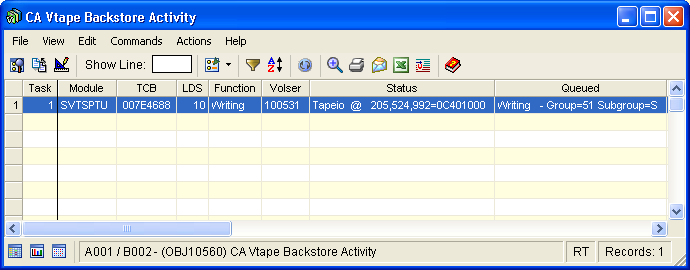
Note: Click the Help About Object tool bar icon ( ), to display a description of the field values displayed in the columns in the Backstore Activity object.
Backstore Activity Object Actions Menu
The following actions are available from the Actions menu option located on the Backstore Activity object view Menu Bar:
This command activates or deactivates the high-speed open option used by CA Vtape for externalizing or recalling virtual volumes to or from physical backstore files.
Virtual volumes are saved as files and stacked onto physical cartridges. Modern 10 GB and 20 GB cartridge devices can hold large numbers of these physical files. Open processing performed by the operating system normally positions to a relative file by issuing the forward space file channel command. This can result in significant delays as the relative position of a file increases (files near the front of the tape can be accessed quickly while files near the end of the tape take much longer). Applications can provide the block ID for open and this can significantly reduce the time to position to a specific file.
In order to use the high-speed open option CA Vtape records block IDs in the owner field of the catalog entry for the backstore files it creates on physical cartridges.
Note: Only the backstore files used by CA Vtape (that is, HLQ.VVE.Vnnnnnn.PRIMARY/DUPLEX) are affected by the high-speed open option. Catalog entries for the user data sets written onto virtual volumes are not affected in any way by this option.
When the high-speed open option is activated, CA Vtape uses the owner field to record the block id.
When the high-speed open option is deactivated, CA Vtape does not record and/or use any information in the owner field.
While most shops do not use the owner field of the catalog, some shops may have other requirements which may prevent them from allowing CA Vtape to this field in this manner. By activating or deactivating the high-speed open option you can control CA Vtape's use of this field.
After it is activated or deactivated the high-speed open option remains in effect across IPLs until specifically deactivated or activated. In multi-system CA Vtape configurations, the high-speed open option must be activated or deactivated on each individual system.
You can select one of the following options from Set HSOPEN:
Issue this command to activate high speed open.
Issue this command to inactivate high speed open.
This command activates and deactivates the IDRC support. DEFAULT is the system default as specified in SYS1.PARMLIB(DEVSUPxx).
You can select one of the following options from Set IDRC:
Activates IDRC support.
Inactivates IDRC support.
Sets IDRC to the system default.
This command was created for Disaster Recovery flexibility. The default order for Recall from Backstore is from the Primary backstore data set. In a DR site it is likely the Duplex should be used, if it exists. This command allows the order to be switched at the local system (LPAR) level. The current value is displayed as the Recall order field using the SVTS STATUS command. The value is maintained across SVTS restarts.
You can select one of the following options from Set Recall:
Sets recall to primary.
Sets Recall to duplex.
Sets Recall to triplex.
Issue this command to alter the number of physical drives that CA Vtape can use to perform Externalization.
Parameters for Set Max Drives are:
2 digit number (01-99). Default is 01.
Remove the selected Virtual Volume from its externalization queue.
The CHECK BACKSTORE command checks the externalization queues looking for any virtual volume requiring externalization. The queues are browsed starting with GROUP=01 SUBGROUP=S and ending with GROUP=74 SUBGROUP=L. The SVTS subsystem automatically executes this command every 5 minutes, but you can issue it manually.
Occasionally, the externalization queue may become corrupted. Some manifestations of this can be a circular queue, which will be detected and a message issued. This Reset Queue action can be used to repair most queue corruption.
If Reset is unable to resolve the problem, Init may be used to re-initialize the Externalization Server subgroup queues. In this case no entries are added back and the queues remain empty until the batch utility GRRJCL is run to dynamically rebuild the queues.
Gracefully stop all externalization tasks in progress, releasing the physical tape devices. Gracefully stop all recalls in progress, releasing the physical tape devices. Hold all externalization groups and restart SVTSAS.
This action terminates the Backstore Engine task that matches the selected Task number.
|
Copyright © 2013 CA Technologies.
All rights reserved.
|
|