

Installing Your Product Using CA CSM › How to Install Your Product Using CA CSM › Install a Product
Install a Product
CA CSM simplifies and manages SMP/E installation tasks. You can browse and install a product that you acquired and that is available in the product list on the Products page. You can also install the maintenance for the products that are currently installed in a managed SMP/E environment on the driving system.
You perform the following high-level tasks to install a product using CA CSM:
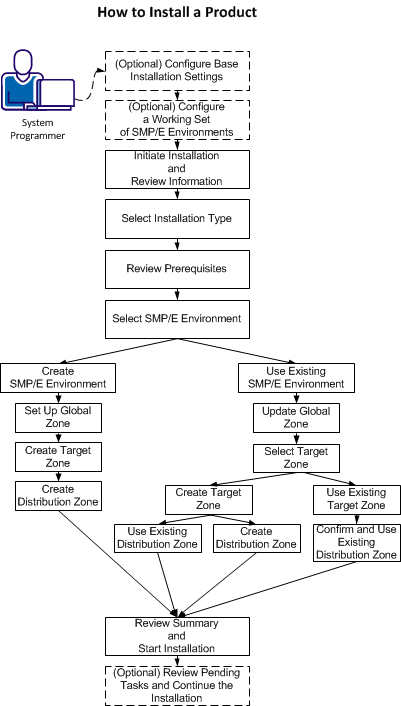
- (Optional) On the Settings tab, click Software Installation under System Settings, and configure base installation settings.
- (Optional) Click the SMP/E Environments tab, and configure a working set of SMP/E environments.
- Click the Products tab and select a product that you want to install. Start the installation wizard and review product information.
- Select an installation type.
- Review installation prerequisites if any are presented.
- Take one of the following steps to select an SMP/E environment:
- Create an SMP/E environment:
- Set up the global zone.
- Create a target zone.
- Create a distribution zone.
- Use an existing SMP/E environment from your working set:
- Update the global zone.
- Set up the target zone: Create a target zone or use an existing target zone.
- Set up the distribution zone: Create a distribution zone or use an existing distribution zone.
Note: If you install a product or its components into an existing target or distribution zone, older versions are deleted from the zone and associated data sets. We recommend that you use new target and distribution zones for this installation so that you can apply maintenance to your current version, if necessary.
- Review the installation summary and start the installation.
- (Optional) Review pending tasks for the SMP/E environment where you are installing your product. Continue the installation, if applicable.
CA CSM installs the product.
After the installation process completes, check for and install available product maintenance. The product is ready for you to deploy. Sometimes, there are other steps to perform manually outside of CA CSM before continuing.
Copyright © 2015 CA Technologies.
All rights reserved.
|
|