

To reserve space at the logical end of the TMC disk for the STAM control file, use the CMS FORMAT command with the RECOMP option before formatting with VMTSTF. If the TMC resides on a CKD device, you must reserve one cylinder. For example, if the TMC resides on a 10-cylinder minidisk, execute the following command to reserve the control area:
format 1B0 b 9 (recomp
If the TMC resides on an FBA device, use the following formula to determine the number of blocks to reserve:
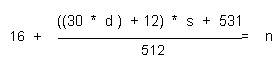
In the formula above:
For example, if the TMC resides on a disk containing 1000 FBA blocks, and 10 tape drives are to be shared by 3 systems, you must reserve 19 blocks by executing the command:
format 1b0 b 981 (recomp
If the TMC has previously existed on an FBA device being shared by multiple VM systems using the CA VM:Tape Shared Disk facility, reformat the control area used for VMTSDF using the above formula. Run VMTSDF and VMTSTF against this new, larger area.
With existing CKD devices utilizing the Shared Disk facility, the cylinder previously reserved for VMTSDF provides sufficient room for VMTSTF; reformatting with RECOMP before running VMTSTF is not required.
|
Copyright © 2013 CA.
All rights reserved.
|
|