

CA Technical Support has collected some of the questions system administrators frequently ask about CA VM:Tape and included the answers here.
CA VM:Tape 1B0=(340)*(# of tapes in library)+ 40%
In the above formula, the 40% factor allows for DSNB records. Information about the first data set on a tape is recorded in the volume record. The DSNs for additional data sets on the tape are added at the end of the TMC in DSNB records that are half the size of a TMC record.
CA VM:Tape 1D0=(370)*(# transactions between TMC backups)+ 10%
Most CA VM:Tape actions that cause the TMC to be altered generate two audit records. Some (such as CATALOG NEXTVOL and CATALOG DROP) may create more.
Take a backup every day, using the VMTBKP utility, immediately after running your daily system backups. If you make sure that your TMC and Audit files reside on separate DASD volumes, then the frequency with which you take backups depends on how much space you can devote to your Audit disk. You never want to risk losing both your TMC and your Audit file at once.
The VMTBACK EXEC, used to invoke the VMTBKP utility, is provided as a sample on the distribution media. If you intend to use VMTBACK, be sure the VMTLIBR 1B0 work disk is linked read/write. To do this, add a LINK and an ACCESS statement to your VMTBACK EXEC. Modify this EXEC according to your site’s needs.
No. The SCRATCH command on any one system updates the TMC for all systems. However, you need to issue the REFRESH command on all other systems to update the Pointer files. For the system on which the SCRATCH command is run, a refresh will be done automatically.
The USERACNT exit lets you modify the accounting field in the TMC. The USREXIT4 user exit creates a CP accounting record.
Yes, unless your CA VM:Tape system is interfaced with the STAM facility or CA MIA. If you are manually sharing drives between systems, you must ensure that a tape drive is never varied online to more than one system at any given time. Without STAM or CA MIA, one system has no way of knowing if another system is using the drive.
The user cannot. The system administrator or tape librarian must use the EDIT command to change the DSSFLAG field to null. This field specifies whether there is a password. Setting the PASSWRD field has no effect.
No. Because of the decentralized I/O in VM/CMS, CA VM:Tape does not receive any information about I/O errors.
It is your responsibility to ensure that the tape labels are updated. You can do this easily using the CMS LABELDEF and FILEDEF commands with an OS simulation application. The label will be written when the data set is opened. CA VM:Tape is concerned only that the volser in the VOL1 label is correct.
By default, neither the MOUNT command nor SLMOUNT does any tape positioning. The tape is always at load point when the mount completes. VM puts complete control of the tape in the user’s hands. If there is a write ring, then users can do anything they want. However, if you want automatic tape positioning, a tape positioning exit (USREXIT7) is available on the distribution media received by your site.
Use the following format of the MOUNT command:
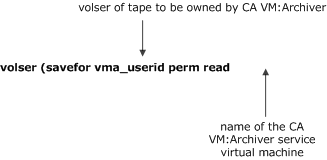
Anytime you add, reorder, or delete any SERIES record in the configuration file, you must run the VMTBUILD utility to write a new TMC. You must provide the current TMC as input to these format utilities to retain current TMC data.
The SLMOUNT EXEC is provided to facilitate mounting standard label tapes to be used by OS simulation applications. The CMS FILEDEF and LABELDEF commands for the ddname TAPEDATA are automatically executed for you. You should modify this EXEC to meet your site’s requirements.
If you have a common set of user IDs for both systems, use different user IDs for the CA VM:Tape virtual machines. This way, you can distinguish tapes created on each system because the CSTEP fields will be different. If you use the VMTAPE configuration file record, you can make the two systems function logically as one system. One limitation you should be aware of is that the Pointer file is not shared between multiple systems. If you mount a scratch tape on VM1, you cannot list the tape or mount it by DSN on VM2 until a refresh is done.
A user can mount someone else’s tape if the user correctly specifies the volser, the data set name, and the password (if one exists). If the data set name is blank or contains binary zeros, other users cannot mount the tape. A user can also mount someone else’s tape by using only a data set name if the user specifies the OWNEDBY option and the password (if one exists). A user must be authorized to use the OWNEDBY option.
Also, a system administrator with ANYTAPE authorization can mount any tape.
If your site is running the CA VM:Secure Rules facility, see the CA Mainframe VM Product Manager Product Interface Guide for more information about how tape mounting can also be controlled with CA VM:Secure rules.
The DEN option on a mount request serves the same function as the DEN option on an allocate request - it assures only that a tape drive capable of the requested density will be allocated to satisfy the mount. It is your responsibility to set the density based on your application. Below are three different ways to make sure the tape is written at the correct density:
Note that if you use the WAIT option on the MOUNT command, CA VM:Tape issues a TAPE MODESET command with the appropriate density for you.
No. EDIT verifies that the data format is correct and does the necessary conversion to packed or binary format. However, it does not logically verify the data.
VMTHSC687E HSC SERVER STKACS ACSRQ=DEFSCR RC=16       REASON=00001004
VMTHSC721E HSC SCRATCH POOL INITIALIZATION FAILED
What do these messages mean, and do they indicate a problem?
These messages mean that the HSC product is already aware of scratch pool definitions. During initialization, CA VM:Tape sends to HSC a list of the scratch pools defined to CA VM:Tape so that the HSC is synchronized.
These messages during initialization are harmless as long as you have not changed your scratch pools in CA VM:Tape. However, if you have changed scratch pools in CA VM:Tape, you should end the HSC product and restart HSC and then CA VM:Tape.
CA VM:Tape implements uniform drive use for ACS drives in the same way it does for all other drives. Basically, drives are checked for availability in the order they appear in response to QUERY TAPES (the order they are given by the DEVICE records in the configuration file) starting with the drive immediately after the last allocated drive.
In addition, the ALLOCATE user exit allows you to further configure drive usage through your own requirements and specifications. This exit contains all information regarding a mount request, and can allow you to reduce or specify the eligible drive list to satisfy the mount.
For external drives (drives not contained inside an ACS), CA VM:Tape already implements uniform drive use.
|
Copyright © 2013 CA.
All rights reserved.
|
|