

Within the Rules Facility, rules are evaluated according to a specific hierarchy. The search for the rule applying to a particular request starts at the system level. System rules are created by the security administrator (or the CA VM:Secure system administrator) and take precedence over other rules in the database. If a rule that applies to a particular request is found at the system level, that rule is used. No more levels are searched. The following flowchart explains the rules evaluation hierarchy:
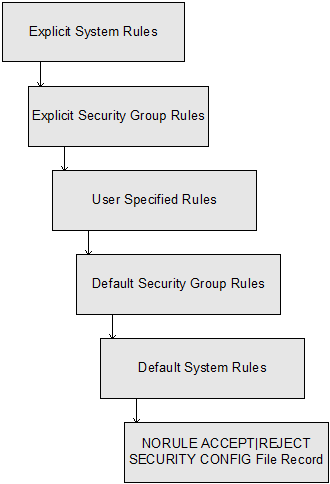
If a rule is not found at the system level, the target user ID security group rules are searched. Rules for a particular security group are created by the security group manager or the security administrator. If a rule is found in the security group rules file, no more levels are searched. If a rule is not found, the rules of the target user are searched next.
The rules evaluation process searches the appropriate file at each level: system override, security group, user, security group default (created by the security group manager or security administrator), and system default (created by the security administrator or the system administrator). When a rule is found that applies to the request, no more levels are searched.
If no rule is found, the site–defined default of ACCEPT or REJECT is applied if the request is for a CP command. If no rule is found for the GROUP command or LOGONBY or CP LOGON BY request, the request is denied. If no rule is found for a CA VM:Secure–controlled CA VM:Tape or CA VM:Schedule command, the request is processed normally by the product solution software.
A warning message displays when you create a rule that is overridden by a rule at a higher level. For example, suppose user SMITH creates a rule that allows all other users to link to his 292 minidisk in multiple–write mode. However, an overriding system rule exists that restricts such link attempts for all users. The following messages display when SMITH updates his rules file:
SYSTEM RULE: REJECT * LINK * MW
OVERRIDES USER RULE: ACCEPT * LINK 292 MW
USER ’SMITH’ RULES UPDATED
These messages display every time SMITH makes a change to his rules file. You must either change the user rule, or change or delete the system rule for user SMITH’s link rule to take effect.
Note: Some rules can specify terminal addresses that identify logical devices (LDEVs), resource IDs, network IDs, real terminals, or IP addresses. A logical device can possibly be an IP address. This is because CP supercedes the logical device with the IPv4 or IPv6 IP address. All other LDEVs (for example, those created by a CA VM:Operator session manager) will continue to use an LDEV.
When these conditions are met, CA VM:Secure ignores rules specifying LDEVs for terminal addresses. Instead, it searches for rules that specify an IP terminal address. This does not apply to rules that indicate all terminal types, for example, ACCEPT * LOGON.
|
Copyright © 2014 CA.
All rights reserved.
|
|