

The Call Watch Details page is a subset of the Watched Calls report and displays information specific to the Call ID you selected. The following details are available, depending on the monitored equipment. Some metrics are specific to a hardware vendor, and some endpoints provide different metrics.
Important: When Call Watch and midstream data exist for a call, the Midstream Metric Details charts are part of the Call Watch Details report.
When number-masking is used, the charts in the Call Watch Details can be difficult to interpret. Chart legends identify each call leg by the directory number. Masking limits the display to specific digits of the directory number, such as only the first digit. In this scenario, the legends are useless because often the first digits in a dial plan are identical.
To decipher the Call Watch Details charts when masking is applied, understand that legend entries are positional. From left to right, the first pair of masked numbers indicates Destination endpoint to Origination endpoint. The second pair indicates Origination endpoint to Destination endpoint, as shown in the following example:
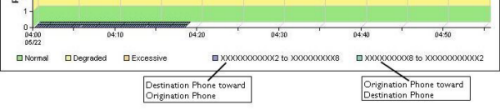
The Call Watch Details page provides the following information:
Summarizes the metrics shown in the Watched Calls report with the MOS rating broken out per call leg, or directional flow of the conversation.
Avaya identifier for a voice gateway call.
Information about the destination endpoint, including the directory number, make and model, call server, voice gateway, codec, firmware version, serial number, and switch connection type. Both the availability and reliability of this information depends on the type of endpoint and your configuration.
Information about the origination endpoint, including the directory number, make and model, call server, voice gateway, codec, firmware version, serial number, and switch connection type.
Availability of this information depends on the type of endpoint.
In an Avaya environment, information about the origination endpoint requires CDR data from the Communication Manager and is available after the call has completed. While the call is in progress, either endpoint can be the origination or destination party. The origination and destination parties can be identified only when CDRs are enabled. When the origination and destination parties are not identified, the Call ID and directory number fields contain an asterisk (*).
The name, IP address, and port of the switch to which the endpoint is connected. This information comes from the web page of the endpoint, which uses Cisco Discovery Protocol (CDP) to collect the information. If the switch does not support CDP, the next CDP-enabled device in the path of the watched call is shown.
Trunk group number for a voice gateway call. While the call is still in progress, the directory number of the endpoint sending data through the gateway cannot be identified. The Trunk Group ID is substituted for the directory number, and displayed in the Phone Number field, until this information is received.
For definitions of these metrics, see Call Quality Metrics.
|
Copyright © 2012 CA.
All rights reserved.
|
|