

Preparing Your Monitoring Environment › Preparing Acme Packet Session Border Controllers
Preparing Acme Packet Session Border Controllers
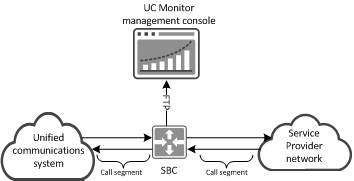
UC Monitor supports Acme Packet Session Border Controllers (SBCs). SBCs are often deployed between a unified communications system and a service provider network. The SBCs use FTP to push specially formatted call detail records (CDRs) to the Data Transformer service on the management console. The management console is configured as the FTP recipient. The Data Transformer service converts the CDRs to XML format. UC Monitor parses the XMLs for the call accounting data and QoS metrics of the ingress and egress call segments for the SBC. The data appears in UC Monitor reports.
The following diagram illustrates how an Acme Packet SBC communicates with UC Monitor:
Notes:
- UC Monitor automatically discovers properly configured Acme Packet SBCs when they push CDRs to the management console. For information about configuring the SBCs, see the use case titled Preparing Acme Packet Session Border Controllers.
- UC Monitor installation creates an FTP site on the management console that supports login by an anonymous user. If your environment requires secure FTP, you can configure any server as the secure FTP recipient, as long as that server then pushes the CDRs to the following location on the management console:
<install directory>\VoipMonitor\FTPSite\ACME.
- The Data Transformer service appears in the Collection Device List as "Transformer." You can edit the Transformer to change the name and to change the IP domain assignment (in environments with multiple IP domains). The Update Status and Reload All features do not apply to the Transformer. You cannot delete the Transformer.
- In UC Monitor reports, MOS values for an Acme Packet SBC reflect the MOS at the SBC, and not the MOS for the devices on either side of the SBC.
More information:
Port and Protocol Requirements
Copyright © 2013 CA.
All rights reserved.
|
|