

The security file contains all security-related information about users, profiles, departments, divisions, zones, and resources. You need to protect your site from loss of data that could occur if your primary security file is damaged, corrupted, or lost. Additionally, you need increased availability of the security file to allow frequent user access. To address these needs, this scenario shows how a security administrator creates a mirror copy of the security file.
The security file is locked anytime a backup is initiated. Users attempting to sign on or perform other security validation checks during a lock can encounter delays, failures, or timeouts. Having a mirror file available allows greater flexibility for when to schedule backup processing (for example, less frequently). Additionally, the mirror file is an exact duplicate of the primary security file and provides up-to-the-minute data in the event of a sudden problem with the primary file.
The following illustration shows how a security administrator creates a mirror copy of the security file:
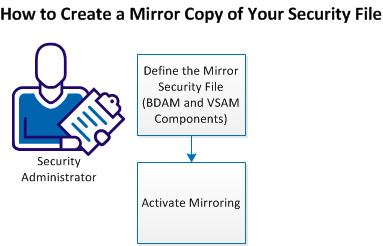
Perform the following tasks to create a mirror copy of your security file:
If you are not sharing the security file on multiple systems, you can maintain a mirror copy of the security file and VSAM file (to use them as backups in a recovery situation). To have these copies available for use, define a mirror security file (including the BDAM and VSAM components).
Important! Mirror files are supported only on systems that do not share the security file (SHRFILE(NO) control option setting). In this environment, the VSAM file should not be defined with an alternate index. If your current VSAM file is defined with an alternate index, copy the file to a VSAM file without an alternate index before performing this procedure.
Follow these steps:
The product provides a VSAMDEFM model in CAI.CAKOJCL0.
Note: TSSMAINT resides in the CA Top Secret CAKOJCL0 data set.
CA Top Secret allocates the mirror security file.
Note: You can use the model that is provided in CAI.CAKOJCL0(TSS).
The following requirements apply to the BDAM and VSAM components:
Your new file is now in place. When you activate mirroring, you can begin using the mirror security file.
Activating the MIRROR control option lets you start maintaining a mirror copy of the security file. This exact duplicate will capture the same information as the primary security file as updates are made throughout the day.
Important! Even if you use mirroring, you should still perform regular backups. If you do not want to manually back up at specific times (through the TSS BACKUP command), we recommend, at a minimum, backing up weekly. The backup should include the DASD containing the active security file and the mirror file.
Follow these steps:
MIRROR(ON)
Note: The MIRROR option is supported only with a non-shared security file.
The option takes effect at the next product startup.
P TSS
START TSS
Mirroring is now active, and an exact duplicate of the security file now exists.
Note: When started for the first time with a new mirror file, CA Top Secret synchronizes the mirror file and primary security file.
With mirroring in place, you can implement a security file backup and recovery plan that backs up less often (to allow greater security file availability for user access).
|
Copyright © 2014 CA Technologies.
All rights reserved.
|
|