

|
|
|
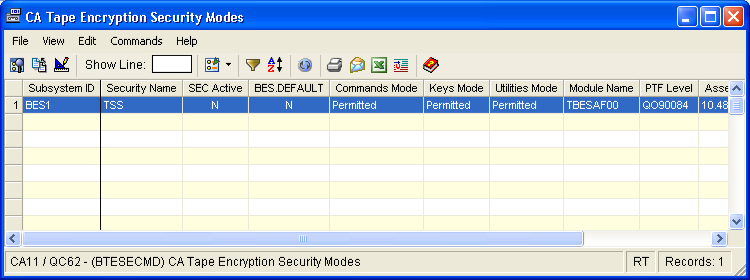
The Security Modes window displays the default security modes for each active CA Tape Encryption address space. The modes are displayed for commands, keys, and utilities. You can see at a glance how security is implemented for each active CA Tape Encryption address space. “Protected” and “Protected Global” indicate a security profile is needed to access the resource. “Permitted” and “Permitted Global” indicate that access to a resource will be permitted if no security profile for the resource exists.
For example, a production CA Tape Encryption address space might show “Protected” or “Protected Global” for each resource type, while a test CA Tape Encryption address might show “Permitted” or “Permitted Global” for the resources. This display is useful in determining what resources are protected or permitted for any active CA Tape Encryption address space. If “BES.DEFAULT” appears as “Y”, reference the “Security Definitions” object to determine what action has been defined for BES.DEFAULT.
To open the display
The Object Tree is displayed in the Windows Client showing the CA Tape Encryption objects.
The Security Mode window opens, as shown in the following sample:
| Copyright © 2010 CA. All rights reserved. | Tell Technical Publications how we can improve this information |