

|
|
|
The Scheduler provides a consistent set of scheduling services for all output activities within the Windows Client environment, for both on-demand and automated events. You can schedule events by day, hour, and minute, or as a delay specified in years, days, hours, and minutes.
For instance, suppose you wanted to be kept relatively up-to-date on the status of currently active encryption and decryption activity. To do this, you could schedule a report based on the Tape Encryption/Decryption Details display to run every morning at 9:00 AM. Set the Destination of the report to Web Publishing. With this setup, GMI would automatically run a report on current encryption and decryption activity every morning and publish the report to the web.
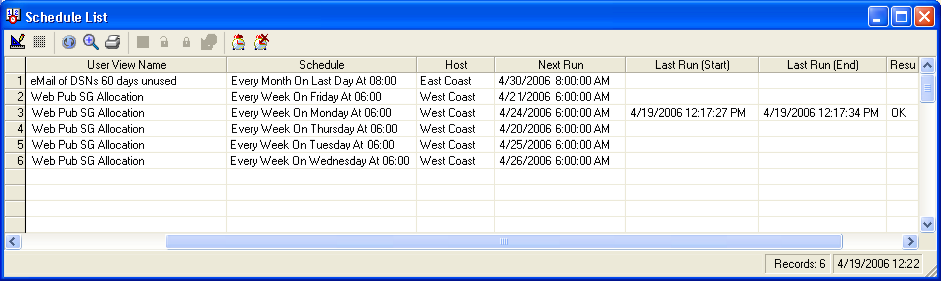
The Windows Client also includes a Schedule List. This is a list of all your scheduled activities. You can use the Schedule List option to start the scheduler and manage scheduled items. The following is an example of the Schedule List dialog:
Schedule List Dialog Toolbar Options
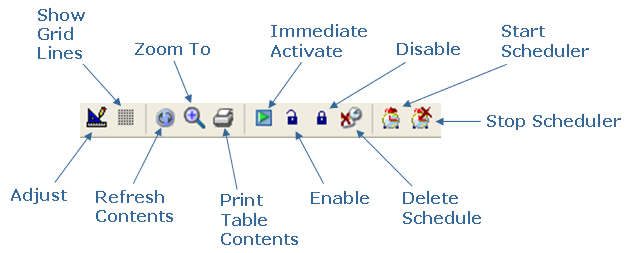
The Schedule List dialog provides the following toolbar options:
Note: For more information about the Scheduler and Schedule List, see the CA Vantage Windows Client User Guide.
| Copyright © 2010 CA. All rights reserved. | Tell Technical Publications how we can improve this information |