

This step applies only if the computer belongs to a security NDS.
CA SRM's Discovery feature searches your network for computers in the selected domain running the Windows operating system. When the process completes, CA SRM lists all eligible computers in the Candidates table of the Selecting Computers to be Managed dialog.
Note: The Discovery process may take a few moments to complete. How quickly CA SRM detects all computers in the selected domain depends on the size of the domain and the speed of your connection.
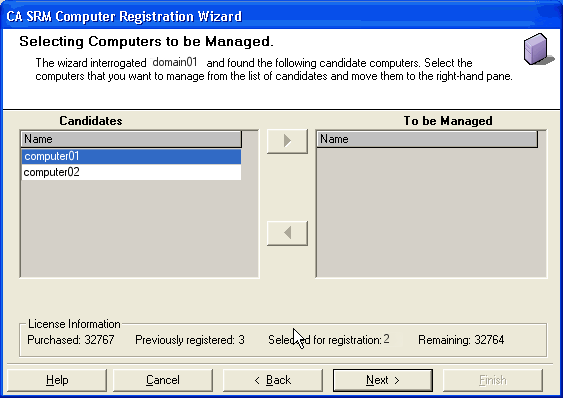
To select a computer for registration, highlight the computer in the Candidates table and click the right arrow  . The computer moves to the To be Managed table.
To remove computers from the To Be Managed table, highlight the computer in the To be Managed table and click the left arrow  .
.
When you have added all the computers that you want to the To Be Managed table, click Next.
Note: If there is a computer that you want to add to the CA SRM database, but which is not listed in the Candidates table, you can add it manually in the next step.
|
Copyright © 2016 CA Technologies.
All rights reserved.
|
|