

In the Selecting a Domain and Defining Security dialog, provide the name of the domain and the proper security credentials for the computers you want to register:
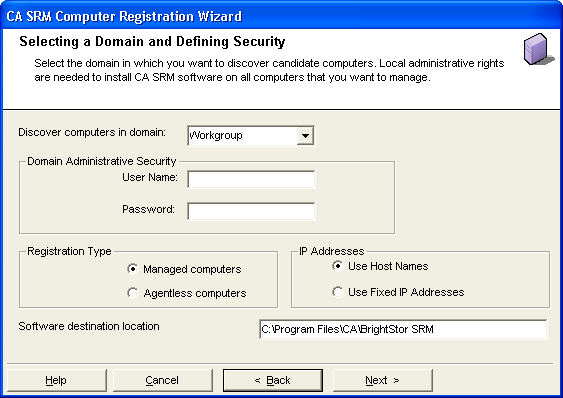
The following list describes the fields on this dialog:
Select the domain that contains the computers you want to register. You can register any number of computers in a given domain during each instance of the CA SRM Computer Registration Wizard, but you can only register computers from one domain at a time.
Enter the name of a user with at least Administrator privileges on the computers you want to register. Typically, users that are members of the Domain Admin group have Administrator privileges on all computers within a particular domain. If you want to register several computers in a domain, consider entering the name of a user with Domain Admin privileges.
The password for the user name.
Specify whether this computer is a managed computer or an agentless computer.
If you select Managed computers, the CA SRM Agent is installed, which enables CA SRM to collect detailed data.
If you select Agentless computers, CA SRM collects basic data using WMI. You need to be an administrator on the Application Server, and a member of the local Administrator group on the target machine.
Specify whether you want to use the host name or the numeric IP address for the computer.
Specify the location in which you want the CA SRM agent to be installed on the target computers.
When you finish entering this information, click Next to start the Discovery process.
|
Copyright © 2016 CA Technologies.
All rights reserved.
|
|