

InfoView is the main workspace for a Business Objects universe. All CA SRM reports are viewed, built, and modified from here. When CA SRM Web Reporter is installed, the CA Reports folder is created in InfoView
To access a CA SRM report
Important! Do not save custom or modified reports in the Templates folder. When future versions of CA SRM Web Reporter are installed, the Templates folder will be overwritten. Any custom work saved in the Templates folder will be lost. If you modify a template or build a custom report, always save it to the User-defined folder or another folder of your choice.
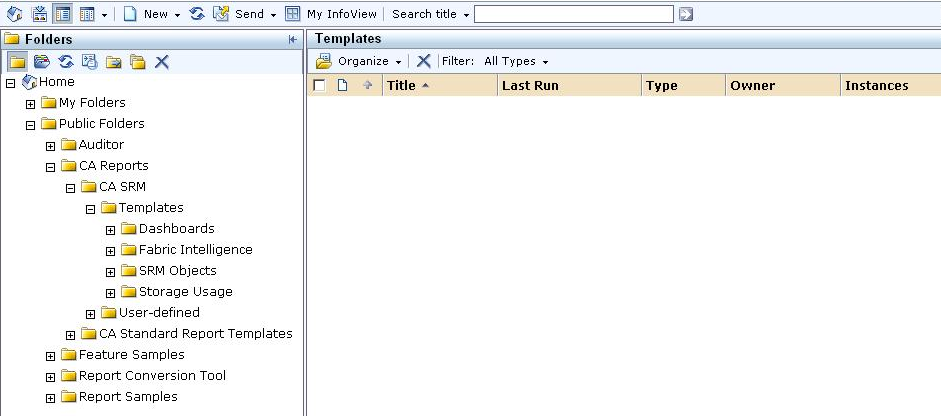
Note: These are the standard folders, and we suggest you keep these folders as they are. If you want to customize any reports, you can add additional folders as necessary.
The CA Reports folder contains the following folder structure:
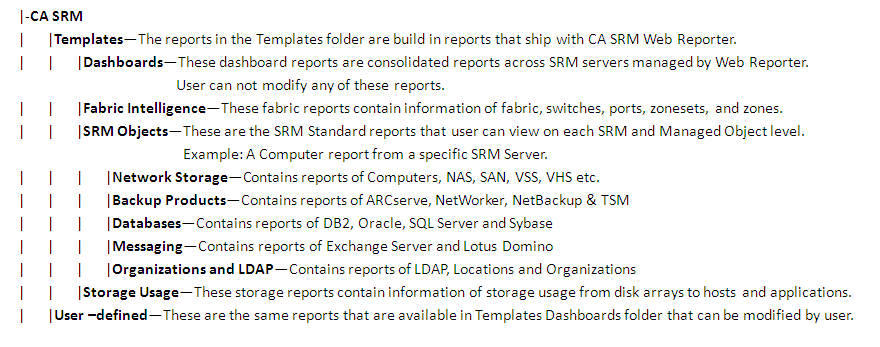
Note: If you have access, these folders are also available from the Business Objects Central Management Console.
The template folder will have Dashboards & SRM Objects sub folders. The reports in the Templates folder are built in reports that ship with CA SRM Web Reporter. They are read-only, so they should not be modified. However, the User-defined folder contains copies of each report from the Templates folder. Use the reports in the User-defined folder as a beginning point to create and save custom reports.
|
Copyright © 2013 CA.
All rights reserved.
|
|