

The Web Reporter Control Panel allows you to connect to the central SQL Server database.
To log in to the SQL Server
If you have previously connected to the central database, you are now connected and do not need to continue with Steps 3 and 4.
If this is the first time connection, then Central Database Login Credentials below dialog appears.
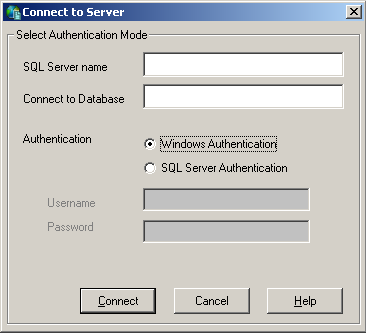
The SQL Server name will be picked by Web Reporter Control Panel by default and you will not be able to edit this field.
Select an authentication mode.
As a prerequisite system requirement, CA SRM Web Reporter uses MS SQL Server as its Central Database. Based on how it was installed, MS SQL Server is configured in one of two modes:
CA SRM Web Reporter supports both modes.
For more information, see the section Authentication Modes and SQL Connections.
Note: If you select Windows Authentication, you cannot edit the user name and SQL Server username and password fields.
If you select SQL Server Authentication, then provide username and password.
|
Copyright © 2013 CA.
All rights reserved.
|
|