

If the parameters of an object (Trendable item) are configured to be measured multiple times a day, then there are multiple records or data points for that object in the trend tables. The multiple data points from one day are consolidated into three data points. The timestamp for this data is set to each day.
Note: Daily consolidation is uncommon, but can be used to track critical IT assets when constant monitoring is required. By default no tables are consolidated daily, but you can activate any table for daily consolidation in the Trend Configuration dialog.
Important! Enabling Daily Consolidation will put lot of overhead on the application and will affect the system's performance.
The consolidation of the all data points collected in a week–starting on a Sunday at 00:00:00 hours, and ending Saturday at 23:59:59 at hours. The timestamp or the HostTime field for these weekly consolidated data points is set to the midpoint–Wednesday–of that week.
The consolidation of all the data points whose timestamp or HostTime falls between the first day and last day of that particular month. The timestamp or the HostTime field for these data points is set to the midpoint–the 15th–of that month.
The consolidation of all the data points whose timestamp or HostTime falls between the 1st day and last day of a calendar year quarter; Jan through March, April through June, July through September, and October through December. The timestamp or the HostTime field for these consolidated data points is set to the middle of the quarter–-the 15th of February, 15th of May, 15th of August, or 15th of November.
The default starting and ending points for these multistage consolidations are as follows:
|
Stage |
Period (default) |
Consolidation Type |
Description |
|---|---|---|---|
|
1 |
0-3 months |
Daily |
Multiple measurements per day are consolidated into 3 data points per day. |
|
2 |
3-6 months |
Weekly |
Daily measurements are consolidated into 3 data points per week. |
|
3 |
6-12 months |
Monthly |
Weekly measurements are consolidated into 3 data points per month. |
|
4 |
Greater than 1 year |
Quarterly |
Monthly measurements are consolidated into 3 data points per quarter. |
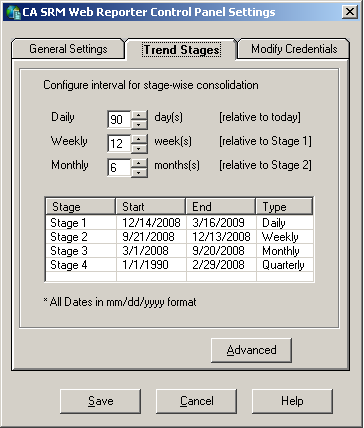
Before changing the trend consolidation periods, it is important to understand each of the three intervals allowed for the stages. The three intervals are Daily, Weekly, and Monthly.
The end date is the current day's date or the trend consolidation "run" date. Start Date is the date obtained by subtracting the interval for Stage 1 and then moving back to align it to the start of the week.
End Date is one day before the start of Stage 1. Start Date is obtained by subtracting the number of weeks (interval) specified for Stage 2.
The End Date is one previous day to the start of Stage 2. Start Date is obtained by subtracting the number of months (interval) specified for Stage 3 and then aligning to the start day (1st) for that particular month.
The End Date is the one previous day to the start of Stage 3. Start Date is by default set to the ZERO_DATE, which is 1/1/1990.
Note: It is unlikely that your system contains trend data dating back to the 1/1/1990 zero date. Therefore, CA SRM Web Reporter is designed to find the date for the first record available in that table. The first day of the year for that particular record-date is set as the default start date for Stage 4.
For example:
Using the default intervals, you would like to calculate the stages from the date Thursday 11/06/2008. To do this, you would set your stages as follows:
Start: 1/1/1990 Monday (the ZERO date)
End: 10/31/2007 Wednesday (one day previous to the start of Stage 3)
Start: 11/1/2007 Thursday (obtained by subtracting 6 months from end of Stage 3)
End: 5/10/2008 Saturday (previous day of start of Stage 2)
Start: 5/11/2008 Sunday (after subtracting 3months or 12 weeks from the end)
End: 8/2/2008 Saturday (previous day of start of Stage 1)
Start: 8/3/2008 Sunday (after subtracting 90 days and aligning it to the previous Sunday)
End: 11/6/2008 Thursday (Run date of the trend consolidation)
From the Trend Stages tab you set the Daily, Weekly, and Monthly intervals for the stage-wise consolidation, and customize each stage period as required by your data collection needs.
To change Trend Stages
|
Copyright © 2013 CA.
All rights reserved.
|
|