

Use the Sort function to sort the instances of the object listed in a table according to one or more object fields.
Every object attribute (or field for z/OS) in a table can serve as a sort key. For data sets, for example, possible sort keys are Data Set Name, VolTyp, Idle Bytes, DSO, and so on.
The following example shows the Sort function:
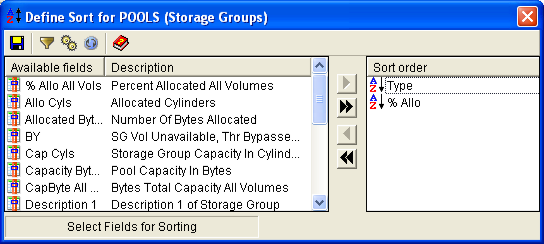
The Windows Client lists the object attributes or fields in the sort window in alphabetical order by name. You can click at the top of the Description column to sort entries by description name. You can reverse the sort order by clicking again at the top of either column.
Use the right and left arrows to move the selected attribute from the Available Fields to the Sort Order window. The first sort key selected (the one at the top of the list in the Sort Order window) is the primary sort key. You can define up to eight sort criteria. When you save your user‑defined view, you automatically save the sort criteria you have defined for a given window. The criteria remain in effect until you change and save them.
Observe the following considerations:
Similarly, a date field that has been assigned a value, but is meaningless, is assigned the field a value of 2155.999. Because this date is still 150 years into the future, it is going to be higher than almost every other date that will show up.
The only time when invalid dates do not sort to the top occurs when fields with real dates ranging from year 2156 to 3999 are present. Dates in this high range are unlikely, but the Windows Client supports dates through Julian 3999.365 (31Dec3999).
Note: Tape data storage objects, often contain date fields. Sometimes these are provided in standard date format, but often they are provided in the form of a numeric date code, typically created by a tape backup software vendor. CA Vantage SRM usually displays these date‑like fields in what looks like the Julian yyyyddd (or ccyyddd) format. This allows the special numeric codes to display in their exact format as well, which is the seven digit numeric value nnnnnnn.
Many of these special codes are higher in value than the standard invalid date of 2155999, such as the CA 1 code for catalog control, which is 9990000. Remember, when examining these date‑like fields, the Windows Client displays them as nnnnnnn numbers, some of which are Julian dates, others just codes.
|
Copyright © 2013 CA.
All rights reserved.
|
|