

When Launch Host Configuration Client is selected under the z/OS menu, the Host Configuration Client is started. If you have defined the host, user ID, or passwords in the Host Definition then the initial display is:
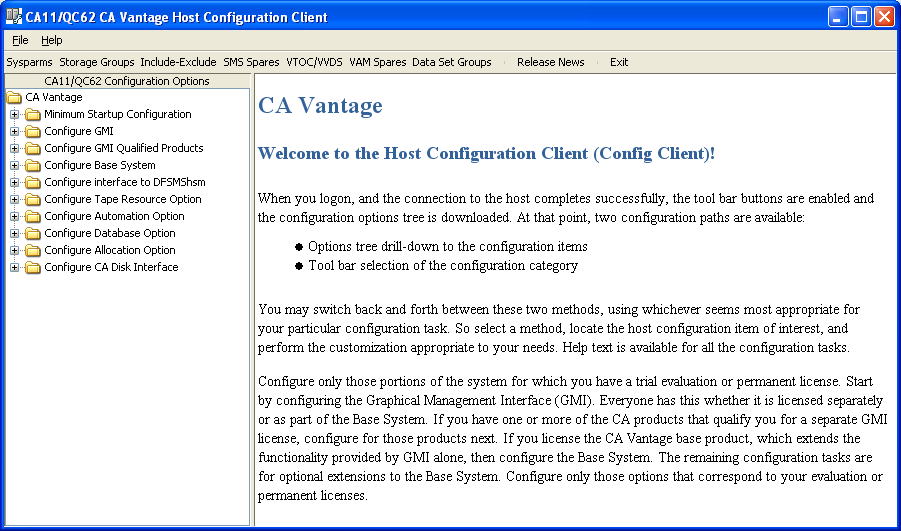
If you have not defined the host, user ID, or passwords in the Host Definition then the Host Configuration Client Logon dialog is displayed. After you provide a valid host, user ID, and password the Host Configuration Client initial dialog is displayed.
The Host Configuration Client can also be launched:
The Host Configuration Client provides a convenient way for you to configure z/OS host components and processes. This client organizes the CA Vantage SRM host into components and organizes the system parameters that apply to each component. Use the Host Configuration Client to configure or view the following:
This option lets you set or modify system parameters. You can select the sysparm you want to edit by navigating the Component Tree or by selecting a specific sysparm from a scrollable list.
This option lets you define new Storage Groups (Pools). You can also modify or delete existing definitions.
This option lets you update the optional include-exclude lists for various objects and functions.
This option lets you identify spare volumes for SMS storage groups.
This option lets you specify appropriate VTOC and VVDS sizes to be used when spare volumes are re-initialized and added to SMS storage groups.
This option lets you identify spare volumes for CA Allocate (VAM) storage groups.
This option lets you define new Data Set Groups (Applications). You can also modify or delete existing definitions.
This option lets you review CA Vantage SRM updates in the current and prior releases.
This option terminates the Host Configuration Client.
Note: See the CA Vantage SRM Installation Guide, Configuration Guide, User Guide, and Reference Guide for more information about Host Configuration Client functions and features.
|
Copyright © 2013 CA.
All rights reserved.
|
|