

An investor at Financepro, Mary Smith, authenticates and clicks a link to access information at BankLtd. Initially, BankLtd cannot find a user account for Mary Smith. BankLtd wants to protect sensitive portions of its website while allowing new customers.
BankLtd has configured CA SiteMinder® Federation Standalone to implement provisioning to establish the new federated identity for Mary Smith. CA SiteMinder® Federation Standalone redirects Mary Smith to the provisioning server at BankLtd. The provisioning application, using identity information from CA SiteMinder® Federation Standalone, creates a user account in the user store.
The following illustration shows the user stores at FinancePro and BankLtd.
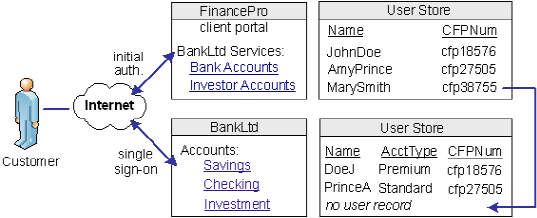
CA SiteMinder® Federation Standalone lets you configure provisioning as part of the partnership configuration at the relying party. In this example, you select remote provisioning and determine how assertion data is delivered to the BankLtd provisioning server. This configuration enables the dynamic creation of a user entry in the user store.
CA SiteMinder® Federation Standalone offers two ways of using attributes to customize target applications.
You can include attributes from a user store record in an assertion to identify a user for the purpose of customizing an application.
Servlets, web applications, and other custom applications can use attributes to display customized content or enable and disable other custom features. When used with web applications, attributes can implement fine-grained access control by limiting user activity at the target site. For example, you send an attribute variable named Account Balance and set it to reflect the account holdings of the user at BankLtd.
Attributes take the form of name/value pairs. When the relying party receives the assertion, it makes the attribute values available to applications.
The relying party receives a set of assertion attributes, which can be mapped to a set of application attributes being delivered to the target application.
For example, FinancePro includes an assertion attribute CellNo=5555555555. At BankLtd, this attribute name is transformed to an application attribute Mobile=5555555555. The attribute name is converted but the value remains the same.
Multiple assertion attributes can also be transformed into a single application attribute. For example, FinancePro sends an incoming assertion with the attributes Acct=Savings and Type=Retirement and transformed at BankLtd into FundType= Retirement Savings.
|
Copyright © 2013 CA.
All rights reserved.
|
|