

When you configure single sign-on for a federation partnership, one of your configuration decisions is determining how users are authenticated.
CA SiteMinder® Federation Standalone offers two authentication choices:
CA SiteMinder® Federation Standalone can perform local authentication; however, Basic and HTML forms are the only available authentication schemes.
Delegated authentication lets CA SiteMinder® Federation Standalone use a third-party web access management (WAM) system to perform the authentication of any user who requests a protected federated resource. The third-party WAM system performs the authentication and then forwards the federated user identity to CA SiteMinder® Federation Standalone. After CA SiteMinder® Federation Standalone receives the user identity information, it locates the user in its own user directory and starts the federation process with the relying party.
A delegated authentication request takes place at the asserting party and it can be initiated at the third-party WAM system or at CA SiteMinder® Federation Standalone. An authentication request can initiate at the relying party; however this is not considered delegated authentication.
Authentication can be initiated as follows:
CA SiteMinder® Federation Standalone can initiate an authentication request at an asserting party. If the request is made to CA SiteMinder® Federation Standalone, it is recognized as a delegated authentication request. CA SiteMinder® Federation Standalone then redirects the user to the third-party WAM system.
When a user logs in to a WAM system at the asserting party, an authentication request is initiated. After the WAM system successfully authenticates the user, the identity information is then forwarded to CA SiteMinder® Federation Standalone.
The relying party can initiate an authentication request, but this scenario is not considered delegated authentication. Delegated authentication occurs only at the asserting party.
A request for a federated resource is made directly to the relying party, who then sends an AuthnRequest to CA SiteMinder® Federation Standalone at the asserting party. CA SiteMinder® Federation Standalone recognizes it as a delegated authentication request and redirects the user to the third-party WAM system at the asserting party. The user logs in to the WAM system, which initiates an authentication request. After the WAM system successfully authenticates the user, the identity information is then forwarded to CA SiteMinder® Federation Standalone.
After the third-party WAM system receives the authentication request, it passes the user identity to CA SiteMinder® Federation Standalone. The method the WAM system uses to pass the user identity depends on whether the delegated authentication method is cookie-based or a query string-based.
The third-party WAM system can use one of two methods to pass a federated user identity to CA SiteMinder® Federation Standalone:
The open format cookie can be encrypted to ensure the security of the data.
The query string is sent in clear text, and it does not produce a FIPS-compliant partnership.
Important! Do not use the query string method in a production environment. The query string redirection method is only for a testing environment as a proof of concept.
The method a third-party WAM system chooses depends on the configuration it wants to establish for passing a user identity to CA SiteMinder® Federation Standalone.
The methods of passing the user identity are detailed in the following sections.
CA SiteMinder® Federation Standalone can use a legacy or open format cookie to pass a user identity. The cookie contains a user login ID as one of its values.
Note: If you configure delegated authentication for use with the CA SiteMinder® Federation Standalone Agent for Windows Authentication, the Agent requires the use of the open format cookie. However, if the CA SiteMinder® Connector is also configured, the open format cookie option for delegated authentication is not available. The CA SiteMinder® Federation Standalone Windows Agent and the CA SiteMinder® Connector cannot coexist in a deployment.
Authentication can begin at the WAM system or at CA SiteMinder® Federation Standalone. If authentication begins at CA SiteMinder® Federation Standalone, it redirects the user to the WAM system, where the authentication process is the same as if it began at the WAM system.
The delegated authentication process is as follows:
Note: To create an open format cookie that is FIPS-encrypted, use a CA SiteMinder® Federation Standalone SDK.
The third-party WAM application must use the same language as the SDK that it is using to create a cookie. If you are using the CA SiteMinder® Federation Standalone Java SDK, the third-party WAM application must be in Java. If you are using the .NET SDK, the third-party WAM application must support .NET.
You can create an open format cookie without using a CA SiteMinder® Federation Standalone SDK. To create the open format cookie cookie manually, use any programming language that supports UTF-8 encoding and any of the following PBE encryption algorithms that CA SiteMinder® Federation Standalone uses for password-based encryption:
You must also be sure that the open format cookie gets set in the user's browser.
To write a complete cookie, review the details about the contents of the open format cookie.
Note: The WAM system and CA SiteMinder® Federation Standalone must be in the same cookie domain.
The following picture shows the cookie method when authentication is initiated at the third-party WAM.
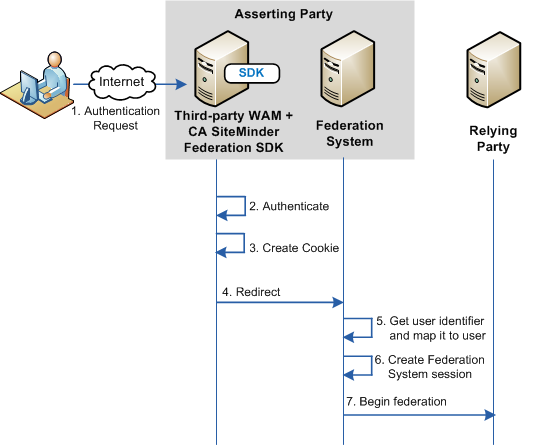
Important! To use the legacy cookie or an SDK-created open format cookie, the third party must install a CA SiteMinder® Federation Standalone SDK. The SDK is a separately installed component from CA SiteMinder® Federation Standalone. The installation kit contains the documentation that describes how to use the SDK for delegated authentication.
A third-party WAM system can pass a user identity to CA SiteMinder® Federation Standalone by appending a query string on the redirect URL that sends the user from the WAM system to CA SiteMinder® Federation Standalone. For this method to work, the third-party WAM system has to configure a URL that redirects federated users to CA SiteMinder® Federation Standalone after they are authenticated.
Important! Do not use the query string method in a production environment. The query string redirection method is only for a testing environment as a proof of concept.
Notes:
If authentication is initiated at the WAM system, the transaction flow for delegated authentication using a query string is as follows:
Important! The LoginID and LoginIDHash parameters are case sensitive. Be sure to include them in the redirect URL as shown in the example.
The hashing mechanism allows CA SiteMinder® Federation Standalone to verify that the user ID has been received unchanged.
Example of a Redirect URL
http://idp1.example.com:9090/affwebservices/public/saml2sso?SPID=FmSP&ProtocolBinding=urn:oasis:names:tc:SAML:2.0:bindings:HTTP-POST&LoginID=jdoe&LoginIDHash=454d3bd5cb839168eeffcf060ae0b9c28ed6eec0
The following graphic illustrates the query string method when authentication is initiated at the asserting party.
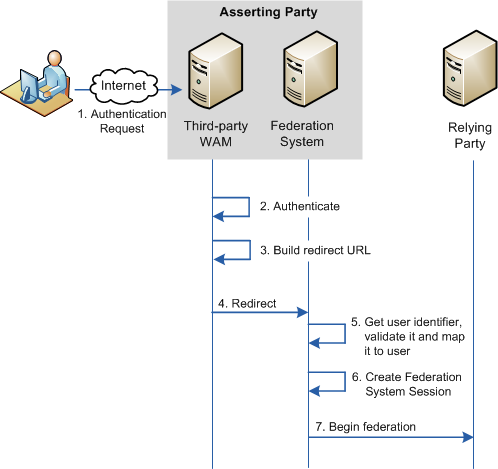
Delegated authentication is configured at the asserting party, where an assertion is generated based on an authenticated user identity.
To configure delegated authentication
Note: The query string does not produce a FIPS-compliant partnership.
Important! To use the SDK-created open-format cookie, the third party must install a CA SiteMinder® Federation Standalone SDK. The SDK is a separately installed component. The installation kit contains the documentation that describes how to use the SDK for delegated authentication.
The following sample configuration is from the perspective of a SAML 2.0 IdP > SP partnership. The delegated authentication settings are on the SSO and SLO step of the partnership wizard.
This sample configuration reflects a SAML 2.0 configuration. The Identity Provider is http://idp1.xyz.com and the third-party WAM system is http://wamservice.xyz.com.
To configure cookie delegated authentication
Note: To edit a partnership, deactivate it first.
Delegated
Open format cookie
For use with a web access management application. You can use a CA SiteMinder® Federation Standalone SDK to create a Java or .NET application. Alternatively, you can use an application written in another language, provided you build the open-format cookie manually.
If you require FIPS 140-2 encryption, create the open-format cookie using the CA SiteMinder® Federation Standalone Java or .NET SDK.
http://wamservice.xyz.com
The URL of the third-party WAM system that authenticates users and uses a CA SiteMinder® Federation Standalone SDK to create the cookie.
Enter the authentication method that is used at the third party. For example:
urn:oasis:names:tc:SAML:2.0:ac:classes:Kerberos
CA SiteMinder® uses these values in the creation of the cookie.
The following sample configuration is from the perspective of a SAML 2.0 IdP > SP partnership. The delegated authentication settings are on the SSO and SLO step of the partnership wizard.
Note: The query string method does not produce a FIPS-compliant partnership.
This sample configuration reflects a SAML 2.0 configuration. The Identity Provider is http://idp1.xyz.com and the third-party WAM system is http://wamservice.xyz.com.
Important! Do not use the query string method in a production environment. The query string redirection method is only for a testing environment as a proof of concept.
To configure query string delegated authentication
Note: To edit a partnership, deactivate it first.
Delegated
Query String
http://wamservice.xyz.com
The URL of the third-party WAM system that authenticates users and constructs the redirect URL back to CA SiteMinder® with the query parameters.
FederatedAuth1
The third-party WAM system uses this secret to hash the login ID.
FederatedAuth1
Enter the authentication method that is used at the third party. For example:
urn:oasis:names:tc:SAML:2.0:ac:classes:Kerberos
For delegated authentication to succeed, the third-party WAM must adjust its federated application, as follows:
For details on implementing the necessary class and methods, see the CA SiteMinder® Federation Standalone Java SDK Guide or the CA SiteMinder® Federation Standalone .NET SDK Guide. Each guide is installed with the SDK. If you create an open format cookie manually, review the details about the required contents of the cookie.
These values are used in the creation of the cookie.
Important! After the third-party WAM system receives an authentication request from CA SiteMinder® Federation Standalone, it must capture and resend any existing query string it receives as part of the incoming authentication request. The incoming request can have CA SiteMinder® Federation Standalone request information within the query string and must be passed along unchanged.
Note: To pass the cookie, the third-party WAM system must be in the same cookie domain as CA SiteMinder® Federation Standalone at the asserting party.
A third-party WAM system and CA SiteMinder® Federation Standalone at the asserting party communicate the login ID in a query string. The WAM system must add the following two attributes to the query string in the redirect URL:
Specifies the value used to identify the user to the third-party WAM system.
A hash of the LoginID.
To generate the LoginIDHash value, the LoginID is prepended to a Hash Secret and the entire value is then run through a SHA-1 hashing algorithm. The Hash Secret is specified in the CA SiteMinder® Federation Standalone configuration at the asserting party.
When CA SiteMinder® Federation Standalone retrieves the credentials from the query string, it also combines these values and hashes them. If the hashes are equal, CA SiteMinder® Federation Standalone considers the login ID to be valid and continues with the federation request.
Important! The LoginID and LoginIDHash parameters are case sensitive.
The third-party WAM system must configure its federated application to construct a redirect URL that sends the user back to the CA SiteMinder® Federation Standalone Single Sign-on service. Therefore, the CA SiteMinder® Federation Standalone Administrator has to communicate the Single Sign-on service to the third party in an out-of-band communication.
Important! After the third-party WAM system receives an authentication request from CA SiteMinder® Federation Standalone, it must remember to capture and resend any existing query string it receives as part of the incoming authentication request. If the incoming request has CA SiteMinder® Federation Standalone request information within the query string it must be passed along unchanged.
The syntax of the query string is as follows:
?existing_query_string&LoginID=LoginID&LoginIDHash=hashed_LoginID
Example
https://johndoe3227.b.com/affwebservices/public/saml2sso?SPID=sp1&
LoginID=user1&LoginIDHash=de164152ed6e8e9a7f760e47d135ecf0c98a
3e4e&ProtocolBinding=urn:oasis:names:tc:SAML:2.0:bindings:HTTP-Artifact
|
Copyright © 2014 CA.
All rights reserved.
|
|